AI Coding Agents Compared 2026: Claude Code, Codex, Cursor & WidelCode
Claude Code, Codex, Cursor, Kiro, Copilot, Antigravity, Devin Desktop and WidelCode compared for 2026: pricing, Claude Sonnet 5.5 and GPT-6.1 Sol, features, and cost control.
WidelAI Research
Evidence-led analysis for practical multi-model AI decisions
AI coding agents in 2026 do far more than autocomplete. Every serious tool now plans work, edits many files, runs your tests, and loops until something passes. So the useful questions for an AI coding agents comparison are different now: which models you are allowed to use, how the bill is metered, how much control you keep over what the agent does on your machine, and how exposed you are when a vendor changes its terms.
The last two weeks moved the market again. Anthropic shipped Claude Sonnet 5.5 on September 28, six days after Claude Opus 5.5, and in Anthropic's own table it beats Opus 5.5 on Terminal-Bench 4.0 at half the price. OpenAI used DevDay on September 29 to put GPT-6.1 Sol into Codex and to split ChatGPT Pro into $100, $200 and $500 plans. Claude Code added Mods on October 1, GitHub Copilot gained computer use the same day, Kiro and Google Antigravity both added the Claude 5.5 models, and the countdown to November 12, when OpenAI plans to stop serving its models in Cursor, kept running.
This guide compares eight tools on facts we checked against vendor pages on October 5, 2026: Claude Code, OpenAI Codex, Cursor, Kiro, GitHub Copilot, Google Antigravity, Devin Desktop (formerly Windsurf), and WidelCode, the multi-model coding agent we build at WidelAI. We are obviously not neutral about the last one, so we have tried to be specific about where it leads, where it trails, and who should pick something else. This edition replaces our September 27 comparison. Besides the new prices and models, it adds a list of deadlines to plan around, a one-week evaluation plan, a security checklist, and notes on moving your setup between agents.
The charts and tools in this article are interactive. They use the same figures as the tables, with sources, so you can explore the numbers instead of taking our word for them. Start with the overview: filter the eight tools by family to see who makes each one, where it runs, which model providers it can use, and what its cheapest paid plan costs.
Eight AI coding agents, side by side
Filter by family to see how each tool is built, who makes the models it can use, and what the cheapest paid plan costs.
8 tools shown
Claude Code
Anthropic
from $20/mo
Model-maker agent, CLI, desktop app, IDE extensions, web
Best for: Terminal-first developers who are happy on Claude models
- Anthropic
Free: Not included on Claude's Free plan
OpenAI Codex
OpenAI
from $20/mo
Model-maker agent, Desktop app, CLI, IDE, cloud
Best for: ChatGPT subscribers who want parallel agents with worktrees
- OpenAI
Free: Included with ChatGPT Free and Go, limited
Cursor
Anysphere, now part of SpaceXAI
from $20/mo
Multi-model editor, Editor, cloud agents
Best for: Developers who want the most polished agentic editor
- SpaceXAI
- Cursor
- Anthropic
- OpenAI(until November 12, 2026)
Free: Hobby, limited agent requests
Kiro
AWS
from $20/mo
Multi-model editor, IDE, CLI, Web
Best for: Teams that want specs, hooks and shared conventions
- Anthropic
- OpenAI
- Open-weight(GLM, MiniMax, DeepSeek, Qwen)
Free: 50 credits a month
GitHub Copilot
GitHub
from $10/mo
Multi-model editor, IDE extensions, CLI, desktop app, GitHub
Best for: The lowest entry price and GitHub-centric work
- OpenAI
- Anthropic
- Moonshot AI(Kimi K3)
- DeepSeek
Free: 2,000 inline suggestions a month, limited chat and agent
Google Antigravity
Google
from $19.99/mo
Model-maker agent, Desktop app, CLI, SDK
Best for: Google-ecosystem developers who want multi-agent orchestration
- Anthropic(Claude 5.5 on Google AI Pro and Ultra)
- OpenAI(until November 2, 2026 (GPT-OSS-120b))
Free: Free individual tier with a weekly quota
Devin Desktop
Cognition
from $20/mo
Multi-model editor, Desktop, CLI, Devin Cloud
Best for: Handing whole tasks to a cloud agent and reviewing the PR
- OpenAI
- Anthropic
- SpaceXAI
- Moonshot AI(Kimi)
- Zhipu AI(GLM)
- DeepSeek
- Cognition(SWE-2)
Free: Light quota
WidelCodeOurs
WidelAI
from $19/mo
Native multi-model agent, macOS app, CLI, VS Code and Open VSX editors, web, iOS, Android, cloud
Best for: Developers who want every major model, visible costs and cloud agents on any device
- Anthropic
- OpenAI
- Moonshot AI
- Zhipu AI
Free: Free download, no free usage tier
Cheapest paid individual plan per month, checked October 5, 2026. We make WidelCode.
What Changed Since Our September 27 Edition
If you read the earlier version of this comparison, these are the changes that affect a buying decision. Each one is in the timeline below with its source.
- Claude Sonnet 5.5 (September 28). $2 input and $10 output per million tokens, the same as Sonnet 5. Anthropic reports 70.6% on Terminal-Bench 4.0, above Opus 5.5's 66.4%. Artificial Analysis measured 64% in its own harness, still ahead of Opus 5.5 and GPT-6 Astra at about 60%, and ranks it second on its Intelligence Index.
- GPT-6.1 Sol in Codex (September 29). Same $2/$10 list price as GPT-6 Sol, cached input halved to $0.10 per million, and 15 to 160 local messages per five-hour window on Plus.
- ChatGPT Pro now comes in three sizes. Pro 100 ($100), Pro 200 ($200) and the new Pro 500 ($500), which has 25 times the Plus allowance and the only personal access to Astra Ultrafast. New Pro 200 subscribers get a smaller allowance than before.
- Claude Code Mods (October 1). Version 2.1.287 lets JavaScript or TypeScript plugins run inside Claude Code, watch or rewrite tool calls, and draw their own interface.
- Copilot computer use (October 1). In public preview in Copilot CLI and the Copilot desktop app on macOS and Windows. On October 2 GitHub also retired Claude Opus 4.7, Kimi K2.7 Code and two Gemini Flash models from Copilot, pointing users to Claude Opus 5.5, Kimi K3 and Gemini 3.8 Flash.
- Kiro and Antigravity add Claude 5.5. Kiro added Opus 5.5 at a 2.0x credit multiplier on September 28 and Sonnet 5.5 at 1.3x on October 2. Antigravity's model page now lists both on Google AI Pro and Ultra.
- WidelCode's CLI and VS Code extension (October 4). Version 0.1.0 previews on npm, the Visual Studio Marketplace and Open VSX, which means the agent also runs inside Cursor, VSCodium and Kiro. WidelCode also added Claude Sonnet 5.5.
We also corrected two things. Devin Desktop and GitHub Copilot both offer more model sources than our first edition credited, so WidelCode is no longer the only tool here with Kimi and GLM models behind one agent. And WidelAI bills credits to two decimal places per request, not rounded up to a whole credit, which the worked examples below now reflect.
The releases and deals that reshaped AI coding agents
Every release, deal and deadline that changes which tool you should pick. Filter by what matters to you.
- Ownership
SpaceXAI closes its Cursor acquisition
The $60 billion all-stock deal for Cursor's parent, Anysphere, closes. Grok 4.6 ships inside Cursor the same week at $2/$6 per million tokens. Source for SpaceXAI closes its Cursor acquisition
- Ownership
OpenAI gives notice to Cursor
OpenAI will wind down its model contract with Cursor, with a proposed shutoff of November 12, 2026, and will not provide future models. Source for OpenAI gives notice to Cursor
- Models
Gemini 3.8 Flash is generally available
In the Gemini API, AI Studio and Antigravity at an introductory $0.75/$3.75 per million tokens through December 31, 2026. Source for Gemini 3.8 Flash is generally available
- Models
GPT-6 Astra launches
OpenAI's frontier model arrives at $10/$50 per million tokens and becomes available in Codex. Source for GPT-6 Astra launches
- Models
Cognition releases SWE-2 for Devin Desktop
Cognition says its new coding model comes close to Claude Fable 5.1 on FrontierCode at 64% lower cost. That is a vendor claim. Source for Cognition releases SWE-2 for Devin Desktop
- Features
Antigravity sandboxes commands on Windows
Version 2.15.1 adds file and network sandboxing for agent commands on Windows. Source for Antigravity sandboxes commands on Windows
- Models
Claude Opus 5.5 becomes Claude Code's default Opus
$4/$20 per million tokens, 20% below Opus 5, with cache reads down 60%. Pro and Team Standard plans now start on Opus. Source for Claude Opus 5.5 becomes Claude Code's default Opus
- Pricing
GPT-6 Sol and Luna reach Codex
Sol at $2/$10 and Luna at $0.10/$0.50 per million tokens, 50% below GPT-5.6 promotional pricing. Source for GPT-6 Sol and Luna reach Codex
- Features
Copilot adds assisted approvals
In public preview: low-risk tool calls in agent sessions are approved automatically, riskier ones still prompt you. Source for Copilot adds assisted approvals
- Models
Claude Sonnet 5.5 launches
$2/$10 per million tokens with 70.6% on Terminal-Bench 4.0 in Anthropic's table, above Opus 5.5. Artificial Analysis measured 64%. Source for Claude Sonnet 5.5 launches
- Models
GPT-6.1 Sol reaches Codex at DevDay
The same $2/$10 price as GPT-6 Sol, cached input cut to $0.10 per million, and 15 to 160 local messages per five hours on Plus. Source for GPT-6.1 Sol reaches Codex at DevDay
- Pricing
ChatGPT Pro splits into three plans
Pro 100 at $100, Pro 200 at $200 with a smaller allowance for new subscribers, and Pro 500 at $500 with 25x the Plus allowance and Astra Ultrafast. Source for ChatGPT Pro splits into three plans
- Features
Claude Code adds Mods
Version 2.1.287 lets JavaScript or TypeScript plugins run inside Claude Code, watch or change tool calls, and draw their own panes. Source for Claude Code adds Mods
- Features
Copilot gets computer use
In public preview in Copilot CLI and the Copilot app on macOS and Windows, with an approval before Copilot controls an app. Source for Copilot gets computer use
- Models
Kiro adds Claude Sonnet 5.5
At a 1.3x credit multiplier across the IDE, CLI, Crew and Web, four days after Opus 5.5 arrived at 2.0x. Source for Kiro adds Claude Sonnet 5.5
- Models
Antigravity lists Claude Opus 5.5 and Sonnet 5.5
On Google AI Pro (not trials) and Ultra. Claude 4.6 models and GPT-OSS-120b are scheduled for removal. Source for Antigravity lists Claude Opus 5.5 and Sonnet 5.5
- Features
WidelCode CLI and VS Code extension ship
Version 0.1.0 previews on npm, the Visual Studio Marketplace and Open VSX, so the agent also runs in Cursor, VSCodium and Kiro. Source for WidelCode CLI and VS Code extension ship
- PricingUpcoming
Free SWE-2 in Devin Desktop ends
Cognition's free SWE-2 usage on self-serve plans runs through this date. Source for Free SWE-2 in Devin Desktop ends
- PricingUpcoming
Grandfathered ChatGPT Pro 200 allowance ends
Eligible Pro 200 subscribers move to the lower included allowance after this date. The price stays $200. Source for Grandfathered ChatGPT Pro 200 allowance ends
- ModelsUpcoming
Antigravity removes Claude 4.6 and GPT-OSS-120b
Claude Sonnet 4.6, Claude Opus 4.6 and GPT-OSS-120b leave the model picker. Source for Antigravity removes Claude 4.6 and GPT-OSS-120b
- OwnershipUpcoming
Proposed end of OpenAI models in Cursor
The shutoff date OpenAI proposed. Plan a replacement if your Cursor workflow depends on GPT models. Source for Proposed end of OpenAI models in Cursor
- PricingUpcoming
Gemini 3.8 Flash introductory price ends
Google's $0.75/$3.75 per million token price is introductory through this date. Source for Gemini 3.8 Flash introductory price ends
Key Dates to Plan Around
Several announced changes land in the next three months. If you rely on any of these, put the date in your calendar now.
| Date | What happens | Who it affects |
|---|---|---|
| October 16, 2026 | Free SWE-2 usage in Devin Desktop and Devin CLI ends | Devin Pro users who leaned on SWE-2 |
| October 29, 2026 | Grandfathered ChatGPT Pro 200 subscribers move to the lower allowance | Heavy Codex users on Pro 200 |
| November 2, 2026 | Antigravity removes Claude Sonnet 4.6, Claude Opus 4.6 and GPT-OSS-120b | Antigravity users on those models, including Free and AI Plus |
| November 12, 2026 | OpenAI's proposed end of its models in Cursor | Cursor users who depend on GPT models |
| December 31, 2026 | Gemini 3.8 Flash's introductory $0.75/$3.75 price ends | Anyone budgeting on Gemini 3.8 Flash |
The pattern behind these dates matters more than any one of them. Model makers increasingly own the tools, and model access has become a competitive lever. A developer who built a workflow around GPT models inside Cursor now has a deadline that has nothing to do with code quality.
How We Grouped the Tools
AI coding agents now fall into three families, and knowing the family tells you most of what you are paying for.
- Model-maker agents. Claude Code (Anthropic), Codex (OpenAI), and Antigravity (Google). Each is tuned for its maker's models and usually bundled with that company's consumer subscription. You get the tightest model integration and the best per-dollar deal on that one provider's models. Antigravity now also offers Claude 5.5 on paid plans, so the lines are blurring.
- Multi-model editors and platforms. Cursor, Kiro, GitHub Copilot, and Devin Desktop. Full IDEs or IDE extensions that route to several providers, often alongside an in-house model (Composer, SWE-2) or an owner's model (Grok for Cursor).
- Multi-model native agents. WidelCode sits here. It is not an editor or an editor fork. One agent runs in a native Mac app, a
widelcodeCLI for macOS, Windows and Linux, a VS Code extension that also installs in Cursor, VSCodium and Kiro, the iOS app, and cloud containers you can start from any device. It lets you pick a model from five providers for each prompt, billed at published per-model rates.
None of these families is strictly better. They make different trade-offs between integration depth, model freedom, and price predictability.
AI Coding Agent Pricing Compared
Individual plans, monthly prices in US dollars, as published on each vendor's pricing page on October 5, 2026.
| Tool | Free option | Entry paid plan | Mid tier | Top individual tier |
|---|---|---|---|---|
| Claude Code | Not on the Free plan | Pro $20 ($17/mo billed annually) | Max 5x $100 | Max 20x $200 |
| OpenAI Codex | Included with ChatGPT Free and Go, limited | Plus $20 | Pro 100 $100, Pro 200 $200 | Pro 500 $500 |
| Cursor | Hobby, limited agent requests | Pro $20 | Pro+ $60 | Ultra $200 |
| Kiro | 50 credits/month | Pro $20 (1,000 credits) | Pro+ $40 (2,000), Pro Max $100 (5,000) | Power $200 (10,000) |
| GitHub Copilot | Free, 2,000 inline suggestions/month | Pro $10 (1,500 AI credits) | Pro+ $39 (7,000 AI credits) | Max $100 (20,000 AI credits) |
| Google Antigravity | Free individual tier, weekly quota | Google AI Pro $19.99 | Google AI Ultra $99.99 (5x) | Google AI Ultra $199.99 (20x) |
| Devin Desktop | Free, light quota | Pro $20 (free SWE-2 through Oct 16) | None | Max $200 |
| WidelCode | Free download, no free usage tier | Starter $19 (2,000 credits) | Pro $49 (7,000 credits) | Enterprise, priced on request |
A few details change how these numbers read in practice:
- GitHub Copilot credits are dollars in disguise. One AI credit equals $0.01. Pro's $10 subscription includes $10 of base credits plus a $5 flex allotment, which is where the 1,500 figure comes from. Pro+ adds a $31 flex allotment to its $39 base, and Max adds $100 to its $100 base. GitHub notes that flex allotments may change over time. Inline suggestions stay unlimited on paid plans.
- Kiro bills fractionally. Credits are consumed in 0.01 increments, and each model carries a multiplier: Claude Opus 5.5 is 2.0x, Claude Sonnet 5.5 is 1.3x, and GPT-5.6 Sol is 4.4x for requests up to 272K tokens, doubling above that.
- Codex and ChatGPT Work share one allowance. OpenAI publishes estimated local messages per five-hour window for each plan and model, and a weekly limit may also apply. On Plus, the range for GPT-6.1 Sol (15-160) is roughly three times that for GPT-6 Astra (5-45), so the model you choose changes how far a plan goes. OpenAI also notes that higher reasoning effort uses more allowance and does not always produce a better result. On Pro plans, Fast mode draws the allowance 2.5 times faster and Astra Ultrafast 8 times faster, according to OpenAI's Pro tiers article.
- Antigravity has no standalone subscription. Paid quota comes with Google AI plans and refreshes every five hours up to a weekly cap. The Claude 5.5 models need a paid, non-trial Google AI Pro or an Ultra plan.
- WidelCode has no separate desktop price. The same WidelAI plan covers chat on the web, iOS and Android and the coding agent in the Mac app, the CLI, VS Code and the cloud. One credit corresponds to $0.005 of provider API cost, and every model's rate is published on the pricing transparency page. Cloud agents add container time at 0.5 credits per minute, published on the same page. Teams can buy pooled seats on the Teams plan, covered below.
Drag the budget to see what each tool gives you at a given price, then switch to the team view and change the team size. The order shifts as you go: Devin Desktop's $80 team fee makes it pricier than WidelAI Pro for teams of up to eight, and cheaper from nine developers up.
What your money buys in each tool
Each dot is a paid individual plan. Drag the budget to see the best plan each tool offers at that price.
Claude Code
Pro $20, $17/mo billed annually
Claude Code plans: Pro $20 ($17/mo billed annually); Max 5x $100; Max 20x $200. Best within $20: Pro $20 ($17/mo billed annually).
OpenAI Codex
Plus $20
OpenAI Codex plans: Plus $20; Pro 100 $100; Pro 200 $200; Pro 500 $500 (25x Plus, Ultrafast). Free option: Included with ChatGPT Free and Go, limited. Best within $20: Plus $20.
Cursor
Pro $20
Cursor plans: Pro $20; Pro+ $60; Ultra $200. Free option: Hobby, limited agent requests. Best within $20: Pro $20.
Kiro
Pro $20, 1,000 credits
Kiro plans: Pro $20 (1,000 credits); Pro+ $40 (2,000 credits); Pro Max $100 (5,000 credits); Power $200 (10,000 credits). Free option: 50 credits a month. Best within $20: Pro $20 (1,000 credits).
GitHub Copilot
Pro $10, 1,500 AI credits
GitHub Copilot plans: Pro $10 (1,500 AI credits); Pro+ $39 (7,000 AI credits); Max $100 (20,000 AI credits). Free option: 2,000 inline suggestions a month, limited chat and agent. Best within $20: Pro $10 (1,500 AI credits).
Google Antigravity
Google AI Pro $19.99
Google Antigravity plans: Google AI Pro $19.99; Google AI Ultra 5x $99.99; Google AI Ultra 20x $199.99. Free option: Free individual tier with a weekly quota. Best within $20: Google AI Pro $19.99.
Devin Desktop
Pro $20, free SWE-2 through October 16
Devin Desktop plans: Pro $20 (free SWE-2 through October 16); Max $200. Free option: Light quota. Best within $20: Pro $20 (free SWE-2 through October 16).
WidelCode
Starter $19, 2,000 credits
WidelCode plans: Starter $19 (2,000 credits); Pro $49 (7,000 credits). Best within $20: Starter $19 (2,000 credits).
Monthly US list prices checked October 5, 2026, before tax and usage-based overage. Claude team seats and ChatGPT Business seats for Codex have plan-specific usage rules, so they are not charted.
Annual Cost for a Team of 10
Team pricing is where the differences compound. These figures use published per-seat list prices and ignore usage-based overage.
| Option | Per month (10 developers) | Per year |
|---|---|---|
| GitHub Copilot Business ($19/user) | $190 | $2,280 |
| WidelAI Starter x10 ($19 each) | $190 | $2,280 |
| Kiro Pro x10 ($20 each) | $200 | $2,400 |
| Google AI Pro x10 for Antigravity ($19.99 each) | $199.90 | $2,398.80 |
| WidelAI Teams, 10 seats ($25 per seat, 3,000 pooled credits each) | $250 | $3,000 |
| Cursor Teams, Standard seats ($40/user) | $400 | $4,800 |
| GitHub Copilot Enterprise ($39/user) | $390 | $4,680 |
| Devin Desktop Teams ($80 plus $40 per developer seat) | $480 | $5,760 |
| WidelAI Pro x10 ($49 each) | $490 | $5,880 |
Claude Code team seats and ChatGPT Business seats for Codex are priced per seat with plan-specific usage rules, so check the current rate with each vendor before you budget. WidelAI Teams costs $25 per seat per month with a two-seat minimum. Each seat adds 3,000 credits to one shared pool, admins can set a monthly cap per member, and usage is broken down by member and by model with CSV export. The table uses the monthly rate; billed annually at $250 per seat, ten seats cost $2,500 a year. Individual Starter and Pro plans and Enterprise remain available, and the pricing page lists every plan.
Feature Comparison: What Each Agent Actually Offers
| Capability | Claude Code | Codex | Cursor | Kiro | Copilot | Antigravity | Devin Desktop | WidelCode |
|---|---|---|---|---|---|---|---|---|
| Main surfaces | CLI, desktop app, IDE extensions, web | Desktop app, CLI, IDE, cloud | Editor, cloud agents | IDE, CLI, Web, Crew | IDE extensions, CLI, desktop app, GitHub | Desktop app, CLI, SDK | Desktop, CLI, Devin Cloud | macOS app, CLI (macOS, Windows, Linux), VS Code and Open VSX editors, iOS, cloud agents started from web, mobile or desktop |
| Model providers | Anthropic | OpenAI | SpaceXAI, Cursor, Anthropic, Google; OpenAI until Nov 12 | Anthropic, OpenAI, open-weight | OpenAI, Anthropic, Google, Kimi K3, DeepSeek | Gemini, plus Claude 5.5 on paid plans | OpenAI, Anthropic, Google, SpaceXAI, SWE-2, plus DeepSeek, Kimi and GLM | Anthropic, OpenAI, Google, Moonshot, Zhipu |
| MCP servers | Yes | Yes | Yes | Yes | Yes | Yes | Yes | Yes |
| Hooks, skills, rules | Yes, plus in-process Mods | Skills, plugins, automations | Yes | Yes (hooks, steering, skills) | Custom agents and instructions | Yes, plus a plugin marketplace | Yes | Yes (AGENTS.md, rules, hooks, skills, custom agents) |
| Parallel or background work | Subagents, cloud sessions | Worktrees, cloud tasks | Cloud agents, Projects | Kiro Web, Crew, parallel spec tasks | Cloud agent opens PRs | Parallel agents, scheduled tasks | Devin Cloud | Subagents, worktrees, cloud agents that open PRs |
| Spending guardrail | Five-hour and weekly limits | Plan allowance, then credits | Included usage, then overage | Credits, opt-in overage | AI credit allowance, buy more | Five-hour refresh, weekly cap | Quotas, extra usage at API price | Server-enforced per-run credit ceiling, live cost meter |
Two rows deserve emphasis. Model providers determine your exposure to events like the OpenAI and Cursor split. Spending guardrails determine whether a long agent run can surprise you at the end of the month.
If you already know what you cannot live without, filter by it. Pick one or more must-haves and only the tools that fully support every one stay lit. Select all five and three remain: GitHub Copilot, Devin Desktop and WidelCode.
Filter the tools by what you actually need
Select one or more must-haves. A tool stays lit only if it fully supports every one.
Pick what you need. Tools that do not have it fade out.
| Tool | Runs on Windows or Linux | Connects to MCP servers | Background or cloud agents | Models from three or more providers | Works inside VS Code or JetBrains |
|---|---|---|---|---|---|
| Claude Code | Yes | Yes | Yes: Cloud sessions | No: Anthropic only | Yes |
| OpenAI Codex | Yes | Yes | Yes: Cloud tasks | No: Built around OpenAI | Yes |
| Cursor | Yes | Yes | Yes: Cloud agents | Yes: OpenAI models end November 12, 2026 | No: Is its own editor |
| Kiro | Yes | Yes | Yes: Kiro Web and Crew | Yes | No: Is its own IDE |
| GitHub Copilot | Yes | Yes | Yes: Cloud agent opens PRs | Yes | Yes |
| Google Antigravity | Yes | Yes | Yes: Scheduled background tasks | Limited: Gemini plus Claude 5.5 on paid plans | No: Own desktop app |
| Devin Desktop | Yes | Yes | Yes: Devin Cloud | Yes | Yes: Editor plugins |
| WidelCode | Yes: CLI and VS Code on Windows and Linux; cloud agents from any browser | Yes: Stdio and HTTP servers, per project and per user | Yes: Cloud agents open PRs; start from web, mobile, Mac, CLI or VS Code | Yes: Five providers, chosen per prompt | Yes: VS Code and Open VSX editors; no JetBrains yet |
Capabilities as documented by each vendor on October 5, 2026. "Limited" means partial support and does not count as a match.
How the Models Behind the Agents Compare
An agent is only as good as the model driving it, and every tool here now lets you choose between several. Two kinds of numbers are worth knowing, and they do not always agree: what the model makers publish, and what independent evaluators measure with their own harnesses.
How the models behind the agents score
Switch between the vendor's own table and an independent evaluator. The gap between the two is part of the lesson.
Multi-step work in a command line. Sonnet 5.5 from Anthropic's Sonnet 5.5 table; Opus 5.5 at xhigh effort; GPT-6 Astra at high effort as reported by OpenAI. Higher is better.
- Claude Sonnet 5.570.6%
- Claude Opus 5.566.4%
- GPT-6 Astra57.9%
- Claude Fable 5.155.8%
- Claude Opus 552.3%
- GPT-5.6 Sol37.3%
Vendor-reported results from Anthropic's Opus 5.5 and Sonnet 5.5 launch tables. GPT-6 Astra and GPT-5.6 Sol figures are as reported by OpenAI, and the Claude 5.5 models ran with production safeguards that fall back to other models on some tasks.
Sources: Anthropic, Introducing Claude Opus 5.5; Anthropic, Introducing Claude Sonnet 5.5
What the numbers say, and what they do not:
- Sonnet 5.5 is the surprise of the quarter. Anthropic's Sonnet 5.5 table reports 70.6% on Terminal-Bench 4.0, above Opus 5.5 at 66.4%, GPT-6 Astra at 57.9% (as reported by OpenAI) and Claude Fable 5.1 at 55.8%. Anthropic itself still describes Opus 5.5 as clearly stronger at complex, open-ended work.
- Opus 5.5 still leads most other agentic coding rows in Anthropic's tables. The one row where Astra leads is AutomationBench, 41.4% to 40.0%, run by Zapier.
- Independent runs keep the order and shrink the margins. Artificial Analysis measured Sonnet 5.5 at 64% on Terminal-Bench 4.0, against 59.6% for Opus 5.5, level with GPT-6 Astra at xhigh effort. On its Intelligence Index v4.3 at 58, Opus 5.5 is still first, with Sonnet 5.5 at 56, Fable 5.1 and Astra at 53, and GPT-6.1 Sol at 52.
- Token use changes the bill as much as price per token. Artificial Analysis counted about 193K output tokens per Intelligence Index task for Sonnet 5.5 at max effort, the most it has measured, against about 119K for Opus 5.5 and about 27K for GPT-6 Astra. That is why Sonnet 5.5 at max effort cost about $7.60 per task in its run despite a $10 output price. At lower effort it is far cheaper, and Anthropic's apps default it to medium.
- The cheaper GPT tiers are about cost, not new peaks. GPT-6.1 Sol lands one point below Astra on the Intelligence Index at about a fifth of the token price. GPT-6 Luna remains the budget option at $0.10/$0.50.
- Gemini 3.8 Flash is priced for volume. Google reports 54.9% on HLE-Verified, a vendor-reported result, and says the model deliberately spends more tokens on hard tasks, especially at higher effort levels.
The practical takeaway: no single model wins every task at every price, and the leader changed twice in a week. That is an argument for tools that let you switch models without switching tools.
The Model-Maker Agents: Claude Code, Codex, and Antigravity
Claude Code
Claude Code remains the reference agent for developers who live in a terminal. You run it in your project, it reads and edits files, runs commands, and iterates, and it also runs in the Claude desktop app, inside VS Code, and on the web. Its extensibility is the deepest in this comparison: MCP servers, hooks, skills, plugins with marketplaces, subagents for splitting large jobs, and now Mods.
Mods, added in version 2.1.287 on October 1, are JavaScript or TypeScript plugins that run inside Claude Code rather than beside it. A mod can watch an event, change it, or take it over: hold a risky shell command and ask you first, send one request to a different Claude model, or draw a pane beside the transcript. Some of Claude Code's own features, such as /diff, are now built as mods. The trade-off is that a mod runs with your permissions and is not sandboxed, so treat a community mod like any other code you install. Organization admins can restrict which mods load.
The model story is strong. Claude Opus 5.5 became the default Opus model in v2.1.280 on September 22, Pro and Team Standard plans start on Opus, and Sonnet 5.5 is the faster, cheaper option at $2/$10. A fast mode on Opus 5.5 with up to 2.5x speed costs $8/$40 per million tokens.
Choose it if you want the strongest Anthropic integration and you are happy on Claude models for everything. Watch out for the single-provider lock: there is no GPT, Gemini, Kimi, or GLM in the picker, and a Pro plan that starts on Opus can reach its five-hour limit faster than it did on Sonnet. Check /model after updating, and try Sonnet 5.5 for routine work.
OpenAI Codex
Codex spans a desktop app for macOS and Windows, an open-source CLI, IDE extensions, and cloud tasks, all sharing one ChatGPT allowance. The desktop app is built as a command center: agents run in separate threads per project, built-in worktrees let several agents work on the same repository without conflicts, and skills, plugins, and automations extend it beyond writing code.
DevDay added a lot. GPT-6.1 Sol arrived in Codex alongside GPT-6 Astra, Sol, and Luna. OpenAI's DevDay recap lists more than 20 launches, including a refreshed CLI you can steer by voice with a new /agents view, Code Review for GitHub pull requests and GitLab merge requests, and Codex Security Cloud, which scans whole repositories and prepares fixes. Astra Ultrafast runs up to 300 tokens a second in Codex, but only on Pro 500 and Enterprise.
Choose it if you already pay for ChatGPT and want parallel agents with clean worktree isolation. Watch out for the OpenAI-only default and usage that varies by model: the same plan covers very different amounts of work depending on whether you pick Astra, GPT-6.1 Sol, or Luna. If you are on Pro 200, check what the October 29 allowance change means for you.
Google Antigravity
Antigravity is Google's agent-first platform: a desktop app with a parallel-agent command center, a CLI that replaced Gemini CLI for individual accounts in June, and an SDK for hosting custom agents. Gemini 3.8 Flash is available in it, with a 1M-token context window and low, medium, and high thinking levels.
September and early October were busy. Version 2.15.1 on September 19 added file and network sandboxing on Windows. Version 2.17.0 on September 22 added plan review, let custom agents declare their own hooks, and gave rules a separate 20,000-token budget so a large rules file no longer crowds out skills and MCP tools. Version 2.18.1 brought a plugin marketplace, and 2.19.1 lets you message a running subagent directly. The model page now lists Claude Opus 5.5 and Sonnet 5.5 for Google AI Pro (not trials) and Ultra, while Claude 4.6 and GPT-OSS-120b leave on November 2.
Choose it if you work in the Google ecosystem and want multi-agent orchestration with a built-in browser, now with Claude 5.5 in the same picker. Watch out for quota opacity: limits meter agent work rather than prompts, and each parallel agent draws from the same pool.
The Multi-Model Editors: Cursor, Kiro, Copilot, and Devin Desktop
Cursor
Cursor is still the most polished agentic editor, with cloud agents, Bugbot code review, MCP, skills, and hooks on Pro. Its in-house Composer 2.5 model lists at $0.50/$2.50 per million tokens, and Grok 4.6, released with SpaceXAI in August, starts at $2/$6. Projects, launched September 10, gives a large body of work one coordinator agent that plans it and hands the coding to subagents. Teams and Enterprise plans also gained two bots: Rollouts, which watches a change as it deploys, and Security Review, which reports exploitable bugs on every pull request.
The ownership change is still the story to plan around. OpenAI has said it will stop providing its models to Cursor, with a proposed shutoff of November 12, 2026, and that it will not supply future models. If your Cursor workflow depends on GPT models, you have about five weeks to validate an alternative inside or outside the editor. One option is to keep Cursor and add a second agent that does have OpenAI models: WidelCode's extension installs in Cursor from Open VSX.
Choose it if you want the richest IDE experience and are comfortable with Grok, Composer, Claude, and Gemini as your model set. Watch out for overage: once included usage is spent, additional usage is billed at model rates.
Kiro
Kiro, from AWS, is built around spec-driven development: requirements, design, and task documents that the agent works through, plus event-driven hooks and steering files for project conventions. It spans the IDE, a CLI, Kiro Web, and Kiro Crew for longer-running delegated work, with per-user usage metrics exportable to OpenTelemetry for administrators.
Its model list keeps growing: Claude Opus 5.5 at 2.0x (down from Opus 5's 2.2x) and Sonnet 5.5 at 1.3x, the GPT-5.6 family with 1M context, open-weight options including GLM, MiniMax, DeepSeek and Qwen models, and a Fable 5.1 preview for Enterprise organizations at a 6x credit multiplier. GPT-6 models had not reached Kiro when we checked.
Choose it if your team benefits from structure and repeatable conventions more than from raw speed. Watch out for multipliers on premium models, which shrink a credit allowance quickly.
GitHub Copilot
Copilot has the broadest editor coverage and the tightest GitHub integration: agent mode in VS Code, Visual Studio, JetBrains, Eclipse, and Xcode, a CLI, a desktop app, code review on pull requests, and a cloud agent that turns issues into PRs. Pro+ and Max can delegate tasks to third-party agents such as Claude and Codex in preview. Its model list is wider than many assume: alongside OpenAI, Anthropic and Google models, it offers open-weight Kimi K3 and DeepSeek, which are off by default for Business and Enterprise until an admin enables them.
The last two weeks brought assisted approvals for agent sessions (September 25), computer use in Copilot CLI and the Copilot app on macOS and Windows (October 1), and code review requests through the REST and GraphQL APIs with a choice of effort level (October 2).
Choose it if you want the lowest entry price, your work already lives in GitHub, or you use a JetBrains IDE. Watch out for heavy agent use on Pro: 1,500 credits is $15 of model usage, and frontier models burn through that quickly.
Devin Desktop (Formerly Windsurf)
Cognition retired the Windsurf brand on June 2 and relaunched the editor as Devin Desktop, with an agent command center as the default surface and Devin Cloud for delegating work to a remote agent that returns a pull request. It supports the Agent Client Protocol, so other compatible agents can run inside it. Devin's model docs list models from Anthropic, OpenAI, Google and Cognition plus open models such as DeepSeek, Kimi, and GLM, the widest catalog in this comparison.
SWE-2, released September 10, is Cognition's most capable model to date, and Cognition is offering free SWE-2 usage in Devin Desktop and the CLI through October 16, 2026. Team pricing is $80 per month for the team plan plus $40 per full developer seat.
Choose it if you want to hand whole tasks to a cloud agent and review the resulting PRs, or you want the most models in one picker. Watch out for extra usage, which is billed at API pricing once quotas run out.
Where WidelCode Leads, and Where It Does Not
WidelCode is one of three tools here that meets every row of the capability filter above, alongside GitHub Copilot and Devin Desktop. It puts models from Anthropic, OpenAI, Google, Moonshot AI and Zhipu AI behind one agent, publishes every per-token rate, and enforces a spending ceiling on every run on the server. Devin Desktop now matches it on provider breadth and Copilot comes close, so model count alone is not the reason to pick it. The combination is.
The same agent runs wherever you work:
- Native macOS app. The Code tab in WidelAI for Mac is a Swift and SwiftUI app, not a VS Code fork and not a web view. You can download it here.
widelcodeCLI for macOS, Windows and Linux, installed withnpm install -g widelcode(Node.js 20 or later) and signed in withwidelcode loginthrough a browser device code.- VS Code extension
widelai.widelcode, on the Visual Studio Marketplace and on Open VSX, so it also installs in Cursor, VSCodium, Kiro and other editors built on VS Code. - Cloud agents you can start from the Code page in the web app, the iOS and Android apps, the Mac app, the CLI or VS Code, with a live timeline, approvals and follow-ups from any device. On the web you can also export a run's event log as CSV.
- An on-device agent in the iOS app, plus chat on the web, iOS and Android.
The CLI and extension are version 0.1.0 previews, published on October 4, so settings and commands may still change before 1.0. The release post covers install steps and CI use.
Locally, the agent reads and edits files in the project you choose and runs commands in your own shell, so the Node, Python, Swift and test runners it uses are the ones you have installed. The extensibility layer is the same in every client:
- MCP servers over stdio and Streamable HTTP, configured per project in
.widelai/mcp.jsonor per user in~/.widelai/mcp.json. Every MCP call asks for approval unless you run in full auto. - Project instructions from AGENTS.md, CLAUDE.md and
.widelai/rules/*.md, so a repository already set up for Codex or Claude Code works without changes. - Hooks in
.widelai/hooks.jsonfor SessionStart, UserPromptSubmit, PreToolUse, PostToolUse and Stop. A hook that exits with code 2 blocks the action. - Skills in
.widelai/skillsand custom agents in.widelai/agents, which can name their own model and permission mode. - Subagents through a
tasktool, up to four in parallel, all drawing on the run's credit ceiling.
The quickest way to understand how it works, and where its safety controls sit, is to watch a run. The simulation below follows the same rules as the apps: which tools ask for approval in each permission mode, when checkpoints are saved, how credits are billed per turn, and what a credit ceiling does.
Watch a WidelCode run, step by step
A small bug fix, played turn by turn. Change the permission mode to see which steps stop for you, and switch models or set a credit ceiling to see what the run costs.
Permission mode
Model
Run credit ceiling
- Press Play run, or step through it with Next turn. Each card is one model turn and the tools it called on your machine.
Illustrative token counts. Credits use WidelAI's published rates, billed to two decimal places per request. With a ceiling, a turn is never allowed to cost more than the run has left: its reply is shortened to fit, and a turn that cannot fit a useful reply is refused. Approval rules match the apps: read-only tools never ask, edits ask only in Ask every time, and commands ask unless you choose Full auto. With assisted approvals turned on, simple read-only commands such as ls, cat and rg run without asking in the default mode; the test command in this run is not one of them.
Here is where we think it leads the other tools in this comparison, and why.
1. Five model providers in one agent, chosen per prompt
WidelCode can drive any tool-capable model in the WidelAI catalog: Claude Opus 5.5, Claude Sonnet 5.5, Claude Fable 5.1, and Claude Sonnet 5 from Anthropic; GPT-6 Astra, GPT-6 Sol, and GPT-6 Luna from OpenAI; Gemini 3.8 Flash from Google; Kimi K3 from Moonshot AI; and GLM-5.3 and GLM-5.3-Flash from Zhipu AI. The pricing page lists what each plan includes. The model is chosen per prompt, so a single session can use Luna for a mechanical rename, Sonnet 5.5 or GPT-6 Sol for the implementation, and Opus 5.5 for the one tricky concurrency bug.
Claude Code is Anthropic-only, Codex is built around OpenAI, Antigravity is Gemini-first, and Cursor is about to lose OpenAI. When a provider changes its terms or ships a better model, you change a dropdown, not your toolchain. Because the extension runs in Cursor and Kiro too, you do not have to give up your editor to get that.
2. You can see the price before you spend it
Most subscriptions in this comparison meter usage in units you cannot see until you hit a limit: five-hour windows, weekly caps, flex allotments that "may change over time," or overage billed afterwards. WidelCode takes the opposite approach:
- Every model's input and output rate is published, and the credit formula is public: one credit is $0.005 of provider API cost, billed to two decimal places per request.
- Cache discounts are passed through. When a provider serves part of the prompt from its cache, those tokens are billed at a discount, at the provider's own ratio for Anthropic, OpenAI and Google models. That matters in an agent, which resends the same context every turn.
- Each run shows a live cost meter as it works.
- You can set a credit ceiling per run, with
--budgetin the CLI,widelcode.budgetCreditsin VS Code, or the ceiling control in the apps. Before every turn the server reserves the turn's worst-case cost and shortens the reply to fit what the run has left, so a run cannot overshoot your number, and those reservations stop parallel runs from jointly overspending your balance. That applies on your laptop and in a container. - Cloud compute is priced in public too. Container time is 0.5 credits per minute, listed on the pricing transparency page and counted toward the same ceiling.
- Runs pause after 50 steps and ask before continuing, so a model that is not converging cannot keep billing quietly.
- When credits run out, generation pauses. There is no overage charge.
3. Safety controls you can reason about
An agent that edits your real files deserves real controls, and WidelCode's are simple enough to explain in a few lines. The defaults differ by client, so here they are side by side.
| Control | CLI and VS Code extension | Mac app |
|---|---|---|
| Separate git worktree and branch | On from the start; --no-worktree edits in place | Turn on worktree sessions in Settings |
| Command sandbox (macOS and Linux) | On from the start; --no-sandbox makes every command ask | An opt-in command sandbox, in beta |
| Assisted approvals for read-only commands | On in the default mode | Turn on assisted approvals in Settings |
| Checkpoints | Before every run | Before every run |
- Worktrees. In a git repository, the agent works on its own branch in a separate worktree, and your checkout stays untouched until you apply the changes, merge them, open a pull request, or discard them.
- The sandbox. Commands run under Seatbelt on macOS, and under bubblewrap on Linux when it is installed. Writes are limited to the project, temp folders and package caches, and network access is optional. Running a command outside the sandbox is a separate approval every time, in every mode. Some toolchains, such as Xcode, SwiftPM, Maven and Go, write outside the project and will ask to run unsandboxed. On Windows, commands are not sandboxed and always ask.
- Snapshot checkpoints. A snapshot is taken before each run, so undo covers what commands changed as well as what the file tools wrote. You can still revert a single edit, one file, or the whole run. Folders that are not git repositories are snapshotted up to 20,000 files and 1 GB.
- Three permission modes. Ask every time, auto-accept edits while confirming commands, or full auto. With assisted approvals on, simple read-only commands such as
ls,catandrgon files inside the project run without asking in the middle mode. - Per-command approvals. "Always allow" is keyed to the command's executable and lasts only for the session, and commands such as
sudo,git push --force, andgit reset --hardcarry an explicit warning in the approval sheet. - Project trust. A project's own hooks and MCP servers run only after you trust the project, and they must be trusted again if their configuration changes. A repository you just cloned cannot run its hooks or start its MCP servers until you say so.
- Folder scoping and credential hygiene. File tools refuse anything outside the project folder, including through symlinks. In the Mac app, your session lives in the macOS Keychain as device-only, and the app is signed and notarized by Apple. The CLI stores its sign-in in
~/.widelai/credentials.jsonwith file mode 0600.
4. One account instead of a stack of subscriptions
Many developers pay for a coding tool and separately for ChatGPT, Claude, or Gemini to think through problems away from the editor. A WidelAI plan covers chat on the web, iOS and Android and the coding agent in the Mac app, the CLI, VS Code and the cloud, with the same account, starting at $19 per month. There are no API keys to paste. For teams, the Teams plan pools credits across seats at $25 per seat per month, with per-member caps and usage by member and model.
5. Parallel work, locally, in CI, or in the cloud
You can run several coding sessions at once, including several in the same project, each on its own worktree and branch. Inside a run, the agent can hand pieces of the job to up to four subagents in parallel. For longer work, a cloud agent runs in its own isolated container, clones your GitHub repository through the WidelCode GitHub App, works on a branch and opens a pull request. You can follow it, answer approvals and send follow-ups from any device, including your phone, and nothing depends on your laptop staying awake. In CI, the CLI runs headless with a personal access token in WIDELAI_TOKEN, refuses side effects unless you pass --mode fullAuto or --yes, and exits non-zero when a run fails.
Where WidelCode is not the right pick yet
A comparison that only lists our wins would not be worth reading. These gaps are real today:
- No JetBrains plugin. In-editor use covers VS Code and editors built on it. IntelliJ, PyCharm and other JetBrains users should look at GitHub Copilot, whose agent mode runs in JetBrains IDEs.
- Commands are unsandboxed on Windows. The CLI and VS Code extension run on Windows and ask before every command, but nothing stops a command you approve from doing anything your user account can. Antigravity already sandboxes commands on Windows.
- The Mac app's command sandbox is opt-in and in beta. It is off until you turn it on there, and some toolchains still need to run outside it. On Linux it also needs bubblewrap, so install that before you count on the sandbox.
- The iOS on-device agent has no shell. It cannot run commands or stdio MCP servers, only HTTP MCP servers. Start a cloud agent from the phone when the job needs a terminal.
- Cloud agents need GitHub. Cloud runs clone through the WidelCode GitHub App, so GitLab and Bitbucket repositories are not supported for cloud runs yet.
- The CLI and extension are early. Version 0.1.0 is a preview, and settings may still move before 1.0.
- Heavy single-vendor use can be cheaper elsewhere. If you run Claude Opus all day and nothing else, a Claude Max plan's subscription limits will likely give you more Opus work per dollar than published per-token rates.
- There is no free usage tier. The apps, CLI and extension are free to download, but running the agent needs a paid plan.
If you live in a JetBrains IDE, Copilot will fit your editor better, and if you spend all day on Claude Opus alone, Claude Code on a Max plan is likely the better deal. If you want model freedom, visible costs, and one agent across your Mac, your terminal, your editor and the cloud, WidelCode is built for you.
What an Agent Run Really Costs
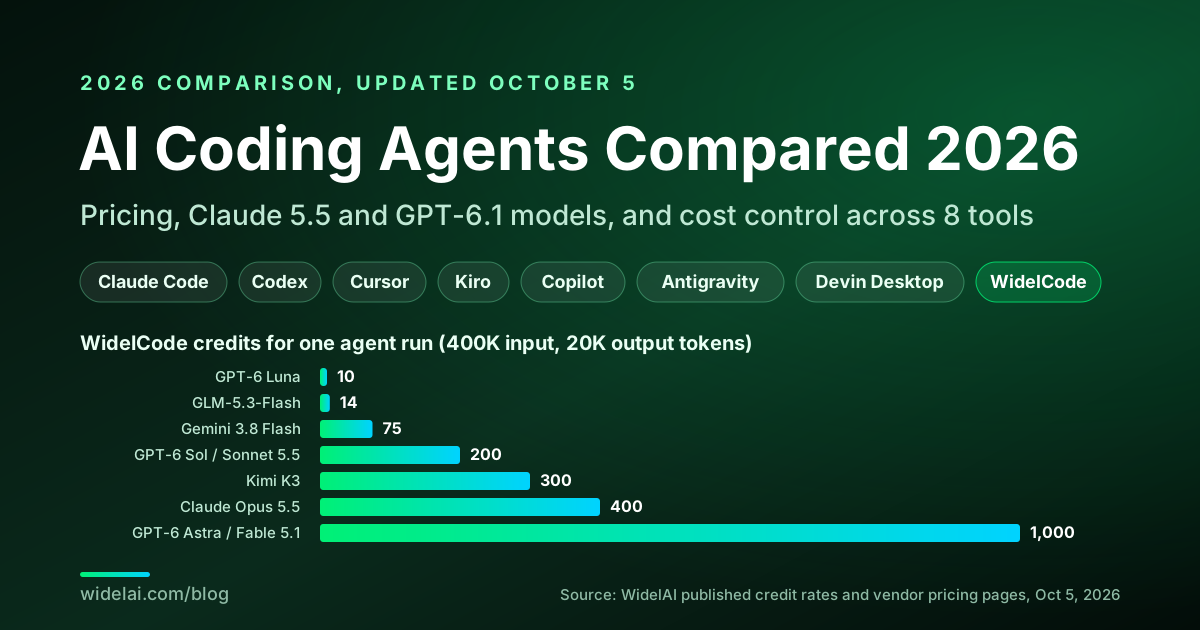
Subscription limits hide the unit economics, so here is the math for one representative agent run on WidelCode: roughly 25 turns that send 400,000 input tokens in total (the transcript is resent each turn) and generate 20,000 output tokens. The formula is:
credits = (input tokens / 1,000 x input rate) + (output tokens / 1,000 x output rate)
| Model | WidelAI rate per 1K (input / output) | Credits for this run | Provider cost equivalent |
|---|---|---|---|
| GPT-6 Luna | 0.02 / 0.10 | 8 + 2 = 10 | $0.05 |
| GLM-5.3-Flash | 0.03 / 0.10 | 12 + 2 = 14 | $0.07 |
| Gemini 3.8 Flash | 0.15 / 0.75 | 60 + 15 = 75 | $0.375 |
| GPT-6 Sol or Claude Sonnet 5.5 | 0.40 / 2.00 | 160 + 40 = 200 | $1.00 |
| Kimi K3 | 0.60 / 3.00 | 240 + 60 = 300 | $1.50 |
| Claude Opus 5.5 | 0.80 / 4.00 | 320 + 80 = 400 | $2.00 |
| GPT-6 Astra or Claude Fable 5.1 | 2.00 / 10.00 | 800 + 200 = 1,000 | $5.00 |
Each request is billed to two decimal places, so rounding adds almost nothing. On a Pro plan's 7,000 monthly credits, that is about 17 runs of this size on Opus 5.5, 35 on Sonnet 5.5 or GPT-6 Sol, or 700 on GPT-6 Luna. Starter's 2,000 credits cover 200 runs at 10 credits each, or 5 at 400.
What caching does to the same run
The table applies full input rates to every token, which overstates real agent costs. Most of each turn's prompt repeats the previous turn, and providers discount repeated prefixes heavily. Suppose 300,000 of the 400,000 input tokens are served from cache:
- Claude Opus 5.5, where cache reads cost $0.20 against $4 for fresh input (5%): 80 credits of fresh input, 12 of cached input and 80 of output, about 172 credits instead of 400.
- GPT-6 Sol, where cached input costs 10% of the fresh rate: 40 + 12 + 40, about 92 credits instead of 200.
Both figures are before cache writes, which Anthropic and OpenAI bill at 1.25x the input rate the first time a prefix is stored. WidelAI passes these discounts through at the provider's ratio for Anthropic, OpenAI and Google models whenever the provider reports cache hits. OpenAI's GPT-6 Sol pricing also shows a trap for long sessions: prompts above 272K input tokens are billed at 2x input and 1.5x output for the whole request, and WidelAI applies the same tier. Start a fresh session for an unrelated task rather than letting one transcript grow forever.
Two conclusions follow. First, the model you pick matters far more than the tool: the same run spans a 100x range, from 10 to 1,000 credits. Second, routing beats loyalty: explore on Luna or GLM-5.3-Flash, implement on Sonnet 5.5, GPT-6 Sol or Gemini 3.8 Flash, and reserve Opus 5.5, Astra, or Fable 5.1 for the turns that need them. Our GPT-6.1 Sol vs Claude Sonnet 5.5 vs Opus 5.5 comparison, GPT-6 Sol vs GPT-6 Luna guide and Claude Sonnet 5.5 vs Opus 5.5 go deeper on those escalation decisions.
Try it with your own numbers. Set the size of a typical run and compare every model at once; tap a model to see what the run means against a WidelAI plan.
Price your own agent run
Set the size of a typical run. Every agent turn resends the transcript, so input tokens add up quickly. Tap a model to see what the run means against a plan.
Credits for this run, cheapest first
Claude Opus 5.5 costs about 400 credits for this run. The most expensive model costs 100x the cheapest for the same work.
Uses WidelAI's published credit rates at full input price, where one credit is $0.005 of provider API cost. When a provider reports prompt-cache hits, WidelAI bills those tokens at a discount (the provider's own ratio for Anthropic, OpenAI and Google models), so real agent runs usually cost less than shown.
Which AI Coding Agent Should You Choose?
Answer four questions and the picker ranks the tools, showing exactly why each one scored where it did. We make one of these tools, so the scoring rules are printed under every pick. If model freedom is your priority, it now ranks Devin Desktop and GitHub Copilot ahead of WidelCode on raw provider count, which is the honest result of that rule. The table after it gives the same guidance at a glance.
Which AI coding agent fits you?
Answer four questions. The picks update as you go, with the exact reasons each tool scored where it did.
1What do you code on?
2What matters most?
3Anything you cannot live without?
4Monthly budget per person
Your top picks
#1
Devin Desktop
- Models from 8 sources
- Pro at $20 fits your $20 budget
#2
GitHub Copilot
- Models from 5 sources
- Pro at $10 fits your $20 budget
#3
WidelCode
- Models from 5 sources
- Pick the model per prompt inside one session
- Starter at $19 fits your $20 budget
We make WidelCode, so the scoring is shown in full rather than hidden. Hard requirements (platform, must-haves, budget) remove a tool; your top priority ranks what is left, and ties go to the cheaper tool.
| If you are... | Pick | Why |
|---|---|---|
| Solo developer on a tight budget | GitHub Copilot Pro ($10) | Lowest entry price, unlimited inline suggestions |
| Terminal-first, happy on Claude models | Claude Code Pro or Max | Deepest Anthropic integration, Mods, plugins and Sonnet 5.5 |
| Already paying for ChatGPT | Codex (Plus and up) | GPT-6.1 Sol and Astra, parallel agents, worktree isolation, Code Review |
| Wants the most polished agentic editor | Cursor Pro | Cloud agents, Projects, Bugbot, Composer and Grok, if you can live without OpenAI after November 12 |
| Team that values structure and conventions | Kiro Pro or Pro+ | Specs, hooks, steering, Claude 5.5, and admin usage metrics |
| Deep in Google's ecosystem | Antigravity (Google AI Pro) | Gemini 3.8 Flash plus Claude 5.5, multi-agent orchestration, Windows sandbox |
| Wants to delegate whole tasks and review PRs | Devin Desktop Pro | Devin Cloud, SWE-2 and the widest model catalog |
| Developer who wants every major model, visible costs and cloud agents on any device | WidelCode (Starter, Pro or Teams) | Five providers per prompt, server-enforced run ceilings, Mac app, CLI, VS Code and Open VSX editors, cloud agents that open PRs, chat on web, iOS and Android included |
Many developers will end up with two tools. A common pairing is an editor-based agent for daily work plus a second agent on a different model family for second opinions. WidelCode fits that role well, because it installs as an extension in the editor you already use and switching models mid-session is how you find the assumption one model made silently.
Run Your Own One-Week Bake-Off
Benchmarks tell you about models. Only your own repository tells you about an agent. This is the evaluation plan we recommend, and it fits in a week with two or three tools on trial.
- Pick five tasks you have already solved. A small bug fix, a refactor across several files, a test you had to write, a dependency upgrade, and one task that needed real thinking. Known answers let you judge the diff, not just the vibe.
- Write one AGENTS.md first. Put your build, test and lint commands and your conventions in it, so every tool starts with the same instructions. Most tools here read AGENTS.md; Claude Code reads CLAUDE.md, and WidelCode reads both.
- Fix the model where you can. Run the same task on the same model in two tools before you compare tools, then vary the model inside your favourite. Otherwise you are comparing models and calling it tools.
- Record four numbers per task. Did it pass your tests, how many times did you intervene, how long did it take, and what did it cost in credits, messages or allowance.
- Try one task in the cloud. Start it, close your laptop, and review the pull request later. This is where tools differ most in practice.
- Check the failure path. Stop a run halfway, revert it, and see what is left on disk. An agent you cannot cleanly undo is a liability.
- Decide on the second tool, not just the first. Note which tool you reached for when the first one got stuck.
Security Checklist Before You Let an Agent Loose
Coding agents run with your permissions. A few habits remove most of the risk, whichever tool you choose.
- Start untrusted repositories in the strictest mode. Ask every time in WidelCode, or the equivalent elsewhere, and read the diffs until you trust the project.
- Treat hooks, MCP servers, plugins and mods as code. They can run commands on your machine. WidelCode will not run a project's hooks or MCP servers until you trust it, and Claude Code's mods are not sandboxed, so review anything you install.
- Sandbox commands where you can. WidelCode's CLI and extension sandbox commands on macOS and Linux from the start, the Mac app offers the same as a setting, and Antigravity sandboxes on Windows.
- Work on a branch. Worktrees in Codex, Claude Code and WidelCode keep your checkout clean until you choose to apply the change.
- Keep secrets out of the context. Do not paste tokens into prompts, keep
.envfiles out of what the agent reads, and scope CI tokens to the job that needs them. - Set a spending ceiling. A per-run credit budget, an overage cap or a weekly limit turns a runaway loop into a pause instead of a bill.
- Know where your data goes. Check each provider's retention terms for the models you enable. GitHub, for example, documents that Anthropic retains Claude Fable data by default for safety classifiers, unlike other Claude models in Copilot.
Moving Between Agents Without Losing Your Setup
Switching tools used to mean rewriting your instructions. That is less true now. The AGENTS.md format is read by Codex, Cursor, Copilot and Devin among others, and WidelCode reads AGENTS.md, CLAUDE.md and its own .widelai/rules, so the same files carry over.
| Setup | Where it lives | Portable? |
|---|---|---|
| Project instructions | AGENTS.md, plus tool-specific files such as CLAUDE.md or Kiro steering | Mostly. Keep the shared part in AGENTS.md |
| MCP servers | Each tool's own config file | The servers are portable; the config format is not |
| Skills | Folders of instructions and scripts | Often, with light renaming |
| Hooks | Each tool's own hook format and event names | Rarely. Plan to rewrite them |
Keep the knowledge in plain Markdown at the repository root, and treat tool-specific configuration as a thin layer on top. Then the next ownership change or price move costs you an afternoon, not a migration.
How to Cut Your AI Coding Costs
- Track two weeks of real usage before upgrading. Most people guess high or low by a factor of two.
- Route by task, not by habit. Mechanical edits do not need a frontier model. In WidelCode, set the model per prompt; in Kiro and Copilot, watch multipliers and per-model credit rates.
- Try Sonnet 5.5 at medium effort before Opus. On several of Anthropic's benchmarks it beats Sonnet 5's best score at low or medium effort for about a tenth of the cost per task, while max effort can be expensive because of its token use.
- Keep instruction files lean. Rules, CLAUDE.md, steering, and similar files are resent constantly. Antigravity's 20,000-token rules budget exists because large rules files crowd out everything else.
- Clear context between tasks. A transcript that is resent every turn is the biggest hidden cost in any agent, and it can push GPT-6 requests past the 272K long-context tier.
- Set hard ceilings where the tool allows them. A per-run credit budget in WidelCode or an overage cap in Kiro turns a surprise into a pause.
- Pay annually only for the tool you are sure about. Claude Pro drops from $20 to $17 per month on annual billing, but this market has changed ownership, models, and pricing within a single quarter. ChatGPT Pro plans are monthly only.
- Plan for model access, not just price. If a single provider leaving your tool would stop your team, that is a risk worth pricing in.
Frequently Asked Questions
What is the best AI coding agent in 2026?
There is no single winner. Claude Code is the strongest single-vendor agent for Claude users, Codex for ChatGPT subscribers, Cursor is the most polished editor, Copilot is the cheapest entry and covers JetBrains, and Devin Desktop has the widest model catalog. WidelCode is the pick if you want five model providers, published per-token rates and server-enforced spending ceilings in one agent across your Mac, terminal, editor and the cloud.
What is the cheapest AI coding agent?
GitHub Copilot Pro at $10 per month has the lowest paid entry price and includes 1,500 AI credits, equal to $15 of model usage, with unlimited inline suggestions. For an agent with every major model, WidelAI Starter costs $19 per month with 2,000 credits, and economical models make those credits go a long way.
Will Cursor lose OpenAI models?
OpenAI announced in late August 2026 that it will wind down its contract providing models to Cursor after SpaceX's acquisition, with a proposed shutoff date of November 12, 2026, and that it will not provide future models to Cursor. Nothing had changed when we checked on October 5.
Which AI coding agent supports the most model providers?
Devin Desktop lists the widest set: Anthropic, OpenAI, Google, SpaceXAI and Cognition's own models, plus DeepSeek, Kimi and GLM. GitHub Copilot adds Kimi K3 and DeepSeek to OpenAI, Anthropic and Google. WidelCode covers Anthropic, OpenAI, Google, Moonshot AI and Zhipu AI, chosen per prompt and billed at a published rate for each model.
Is Claude Sonnet 5.5 or Opus 5.5 better for coding agents?
On Anthropic's Terminal-Bench 4.0 figures, Sonnet 5.5 scores 70.6% against 66.4% for Opus 5.5, at half the price per token, and Artificial Analysis's independent run kept that order at 64% and 59.6%. Anthropic still describes Opus 5.5 as clearly stronger at complex, open-ended work. A practical split is Sonnet 5.5 for most implementation turns and Opus 5.5 for the hardest ones.
Can I use WidelCode inside Cursor or Kiro?
Yes. The WidelCode extension, widelai.widelcode, is published on Open VSX, which Cursor, VSCodium and Kiro use as their extension registry. It is also on the Visual Studio Marketplace for VS Code. It uses your WidelAI account and credits, not the host editor's.
Which coding agents work in CI?
Several do. WidelCode's CLI runs headless with a personal access token and a one-shot -p prompt, Claude Code has a print mode for scripts, Copilot CLI has a programmatic mode, and Antigravity's CLI supports headless runs. Whatever you choose, give the job an explicit permission mode and a spending limit.
Does WidelCode support MCP or run on Windows?
Yes to both. WidelCode connects to MCP servers over stdio and Streamable HTTP, configured per project or per user, and asks before every MCP call unless you run in full auto. The widelcode CLI and the VS Code extension run on macOS, Windows and Linux, and cloud agents can be started from any browser. Two caveats: commands on Windows are not sandboxed, and the iOS on-device agent supports HTTP MCP servers only.
The Bottom Line
The best AI coding agent in 2026 depends on which constraint you feel most. If you want the deepest single-vendor integration, the model makers' own agents are excellent: Claude Code for Anthropic, Codex for OpenAI, Antigravity for Google, which now also offers Claude 5.5. If you want a full editor with many models, Cursor, Kiro, Copilot, and Devin Desktop each have a clear niche, though Cursor users relying on GPT models should plan for November 12.
WidelCode is for developers who refuse to bet their workflow on one model maker and want to see the price of every run. It gives you five providers in one agent across a native Mac app, a CLI for macOS, Windows and Linux, an extension for VS Code and the editors built on it, and cloud agents that open pull requests. It prices every token and every minute of cloud compute in public, passes cache discounts through, and stops every run at the ceiling you set. We have said exactly where it still falls short: no JetBrains plugin, no sandbox on Windows, GitHub only for cloud runs, an early CLI, and no free tier. In a quarter when the leading model changed twice in a week and an acquisition could cut a provider out of a popular editor, model freedom and cost visibility are no longer nice-to-haves.
Browse every model on the models page, compare plans on the pricing page, or read about the WidelCode CLI and VS Code extension and WidelAI for Mac. For the models themselves, see Claude Sonnet 5.5 on WidelAI, what joined WidelAI in September 2026, the Gemini 3.8 Flash guide, and GPT-6 Astra vs Claude Fable 5.1.
Sources
Pricing and feature details were checked against these pages on October 5, 2026. Content was rephrased for licensing compliance.
- Anthropic: Introducing Claude Opus 5.5, Introducing Claude Sonnet 5.5, Claude Platform release notes, and Claude Code Mods
- OpenAI: Codex pricing, About ChatGPT Pro tiers, DevDay 2026 recap, Managing usage in Work and Codex, GPT-6 Sol model pricing, and GPT-6 Sol and Luna announcement
- OpenAI: Introducing the Codex app and Our decision on Cursor following its acquisition by SpaceX
- Cursor: Pricing, Changelog, Models and pricing, and Introducing Grok 4.6
- Kiro: Pricing, Enterprise billing, and Models changelog
- GitHub: Copilot plans and pricing, Supported AI models, Copilot weekly releases, September 21, Computer use in Copilot, Selected models deprecated, and Code review API support
- Artificial Analysis: Claude Opus 5.5 takes the top spot, Claude Sonnet 5.5 reaches #2, GPT-6.1 Sol replaces GPT-6 Sol, GPT-6 Sol and Luna push the cost efficiency frontier, and Intelligence Index v4.3
- Google: Antigravity, Antigravity models, Antigravity release notes, via the gradually.ai changelog mirror, Gemini 3.8 Flash announcement and Google AI subscription updates from I/O 2026
- Cognition: Devin pricing, Devin CLI models, and Windsurf is now Devin Desktop
- AGENTS.md: the open format for agent instructions
- WidelAI: pricing transparency, WidelCode download, and the widelcode package on npm

Do your best AI work in one place
Bring your next question, draft, file, or idea to WidelAI. Choose the model that fits the moment, keep your work together, and stay in control of privacy and usage.
Leading models, one workspace
Use powerful AI models without juggling separate tabs, accounts, or workflows.
Switch without starting over
Change models as your work evolves while keeping the conversation and context together.
The right model for every task
Choose speed for everyday work or deeper reasoning for complex questions and decisions.
Clear credits and model rates
See your balance, understand each model’s rate, and track usage from one place.
Bring your files and images
Work with documents and images alongside your prompts in the same focused experience.
Your work stays yours
Your data is encrypted in transit and at rest, and your content is never used to train AI models.