How to Use Claude Sonnet 5.5: Effort, Prompts, and Cost
A practical Claude Sonnet 5.5 guide: pick the right reasoning effort, write prompts that set scope, get reliable JSON and chart reads, and route work to keep credit costs low.
WidelAI Engineering
Building the future of AI accessibility
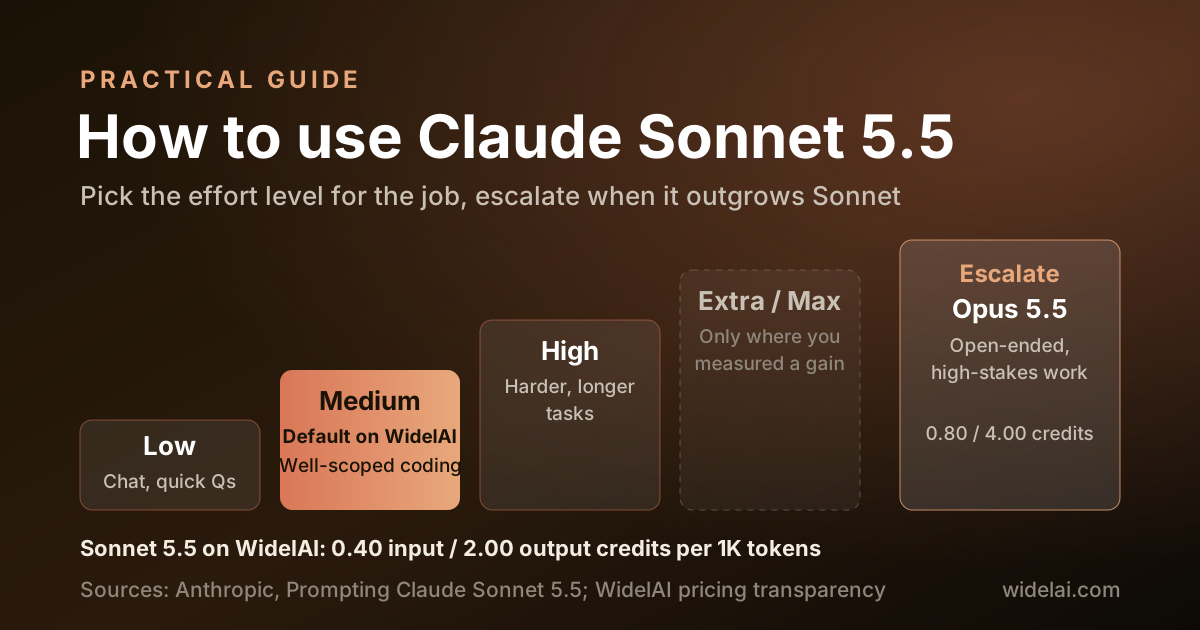
Claude Sonnet 5.5 is fast, capable and priced at 0.40 input and 2.00 output credits per 1K tokens on WidelAI. Getting the most from it comes down to three habits: choosing the right reasoning effort, writing prompts that set scope clearly, and knowing when a task has outgrown it.
Anthropic published a detailed prompting guide for Sonnet 5.5 alongside the model. This tutorial turns that guidance into practical steps for WidelAI's chat and Mac coding agent, with prompt templates you can copy and a routing plan that keeps your credit balance healthy.
New to Sonnet 5.5? Start with Claude Sonnet 5.5 Is Now Available on WidelAI for the specs and benchmarks.
Step 1: Select Claude Sonnet 5.5
- Sign in to WidelAI and open the chat.
- Click the model selector at the top of the conversation and choose Claude Sonnet 5.5 in the Anthropic group. The model tag is
claude-sonnet-5-5. - Next to the model picker, find the Reasoning effort control. It starts at Medium.
Sonnet 5.5 is on the Pro plan. If you are switching from another model mid-conversation, the thread's visible history carries over, so you do not need to paste context again.
Step 2: Choose the Right Reasoning Effort
Effort is the main control for how much Sonnet 5.5 thinks, and therefore for quality, latency and cost. WidelAI offers five levels: Low, Medium, High, Extra and Max. Extra maps to what Anthropic calls xhigh.
Anthropic recalibrated effort for Sonnet 5.5, so a level does not produce the same amount of thinking it did on Sonnet 5. If you had a favorite setting on the previous model, test again rather than carrying it over. Anthropic's starting points translate like this:
| Your work | Start at | Move to |
|---|---|---|
| Chat, quick questions, drafting | Low or Medium | Raise only if answers feel shallow |
| Well-specified coding and multistep tool use | Medium | High for harder or longer tasks |
| Analysis and reasoning without tools | High | Extra if you have measured a gain |
| The hardest problems | Consider Claude Opus 5.5 | Rather than Max on Sonnet |
A few behaviors are worth knowing:
- Low skips thinking on most simple requests and replies fastest. It can also skip verifying its own work, so it is a poor fit for code changes you plan to ship without review.
- From Medium up, the model thinks briefly before almost every reply, even a greeting. That adds a moment before the first word appears. Asking it to "think less" in a prompt does not reliably change this; lowering effort does.
- At Low and Medium on long agentic tasks, Sonnet 5.5 is more likely to stop and check in before finishing. If you want it to carry the work through, raise effort or say so in the prompt.
- Extra and Max are especially thorough. After finishing, the model may start its own review and verification rounds and fix related issues it noticed. That costs more time and credits. Reserve these for work where you have seen the quality gain.
Anthropic's cost curves back this up: Sonnet 5.5 delivers its best value at Low and Medium. When a task seems to need Max, switching to Opus 5.5 is often the better call.
Step 3: Understand What You Are Paying For
WidelAI bills in credits, where 1 credit equals $0.005 of API cost. Sonnet 5.5's rates are:
| Credits per 1K tokens | |
|---|---|
| Input | 0.40 |
| Output | 2.00 |
| Cached input | 0.04 |
Output costs five times as much as input, and thinking tokens count as output. That has three practical consequences.
- Context is cheap. Give it plenty. Pasting a whole file, a full error log or a long spec costs far less than the answer. A 50,000-token codebase excerpt is 20 credits of input.
- Effort shows up in output. Higher effort means more thinking tokens. A Medium turn that writes 1,500 tokens costs 3 credits of output; the same question at Max might write several times that.
- Long threads are good value. When a stable prefix like a spec or a codebase is re-read, Anthropic serves it from cache and WidelAI passes the discount through, billing it at 0.04 credits per 1K. Keep related questions in one thread with the stable material at the top.
Two worked examples:
- A bug-fix exchange with 15,000 tokens of context and a 2,000-token reply:
15 × 0.40 + 2 × 2.00 = 10credits. - A document draft from 40,000 tokens of source material producing 5,000 tokens of output:
40 × 0.40 + 5 × 2.00 = 26credits.
Every model's rate is on the pricing transparency page, and the usage widget on your dashboard shows spend per model.
Step 4: Set Scope Clearly
Sonnet 5.5's initiative depends on effort and on how open the request is. Anthropic describes three patterns worth steering.
It may add things you did not ask for. When coding, Sonnet 5.5 tends to add tests, documentation and small supporting files that match your project's conventions. Most people welcome this. If you want the change kept tight, say so:
Fix the date parsing bug in utils/dates.ts.

Scope:
- Change only what the fix requires
- Do not add new files, tests or documentation unless I ask
- Return a unified diff and a two-sentence explanation
Open-ended requests can turn into big deliverables. Ask "show me what you can do with this data" and it may start building a report or a deck. If you want ideas first, ask for them:
Here is our Q3 support ticket export. Before building anything,
give me five analysis ideas with one line each on what it would show.
I will pick one.
It may pause to check in. On multipart tasks at lower effort, it sometimes stops to confirm a plan. If you want it to keep going, say so explicitly: "Complete all four steps before reporting back. Only stop if something is ambiguous or irreversible."
Step 5: Ask for Evidence on Code Changes
At higher effort Sonnet 5.5 usually checks its own work. At Low it sometimes reports a change as done without running anything. In the WidelAI Mac app's coding agent, where it can run commands in your project, make verification part of the task:
Add input validation to the signup handler.

Before you report the task as done:
- Run the existing test suite and show the result
- If a test fails, fix it or explain why it fails
- Do not claim success without test output
In chat, where the model cannot run your code, ask for the test you should run and the output you should expect. That turns a claim into something you can check in seconds.
Step 6: Get Better Results From Charts and Images
Sonnet 5.5 reads images, and Anthropic reports 61.6% on its Chartography benchmark without tools, close to Opus 5.5's 64.4%. Dense charts and technical drawings are still where detail gets lost. Anthropic found that giving the model a way to crop or zoom helps more than raising effort.
In WidelAI chat, you can get much of that benefit yourself:
- Crop before you upload. If the question is about one panel of a dashboard, upload that panel rather than the full screenshot.
- Send the dense region separately. Attach the full chart for context and a zoomed crop of the part that matters.
- Ask for a transcription first. "List every data point you can read from this chart, then answer the question" makes misreadings visible before they reach the answer.
Step 7: Ask for JSON the Right Way
If you use Sonnet 5.5 to extract structured data, such as totals from an invoice or rankings from a list, Anthropic notes that at Low and Medium it often answers without working the problem out first, which can cost accuracy. Three habits help:
- Ask it to think before answering. Add a line such as "Work out the answer step by step before writing the JSON." At High effort, Anthropic found this brings accuracy close to Extra.
- Let it reason first, then emit JSON last. It will often show its working and end with the JSON. If you are copying the result into a script, take the final JSON block, not the first one; it sometimes writes a draft before the final version.
- Check truncation. If a reply cuts off, treat the JSON as unreliable even if it looks complete, and ask again with room to finish.
One caution: asking the model to reproduce its hidden reasoning verbatim can trigger Sonnet 5.5's reasoning-extraction safeguard. Asking it to explain its answer, show calculations or justify a choice is fine.
Step 8: Route Between Models
The single most useful habit on a multi-model platform is using the cheapest model that clears your quality bar and escalating deliberately. With Sonnet 5.5, a practical ladder looks like this:
| Work | Model | Effort |
|---|---|---|
| High-volume drafting and summaries | GPT-6 Luna or GLM-5.3-Flash | Default |
| Everyday coding, documents, analysis | Claude Sonnet 5.5 | Medium |
| Harder, well-scoped tasks | Claude Sonnet 5.5 | High |
| Open-ended or high-stakes problems | Claude Opus 5.5 | Medium or High |
| Hardest long-horizon agent and research work | Claude Fable 5.1 | High |
To escalate, keep the same thread and switch the model. Before you do, ask Sonnet 5.5 for a short summary of what it has found and ruled out. The next model sees the visible conversation, and a crisp summary is the most useful input you can give it. You can browse every option on the models page.
Prompt Templates to Copy
Codebase orientation
I am new to this repository. Read the files below and give me:
1. A one-paragraph summary of what the service does
2. The request path for POST /orders, file by file
3. The three places most likely to cause the bug described at the end
Slide deck from source material
Using the attached earnings summary and the slide template, draft a
10-slide operating review. Follow the template's layout exactly.
One idea per slide, numbers sourced from the attachment only.
Flag any figure you could not find instead of estimating it.
Spreadsheet cleanup
Here is a CSV of 2,000 customer records. Identify duplicate customers,
explain the rule you used, and return a table of merges to review.
Do not delete anything; I will apply the merges myself.
Common Mistakes
- Carrying over your Sonnet 5 effort setting. Levels are recalibrated. Test again.
- Running everything at Max. It is slower and more expensive, and at that level Opus 5.5 costs about the same per task.
- Starving it of context. Input is a fifth of the price of output. Give it the whole file.
- Leaving scope implicit. Say what should and should not change.
- Accepting "done" without evidence. Ask for test output or a way to verify.
- Asking it to reveal hidden reasoning. Ask for an explanation instead.
Wrapping Up
Claude Sonnet 5.5 rewards a light touch: Medium effort, clear scope, rich context and a request for evidence. Used that way, it handles most everyday work at half the per-token cost of Opus 5.5, and it leaves you a clean escalation path for the problems that need more.
Related Reading

Do your best AI work in one place
Bring your next question, draft, file, or idea to WidelAI. Choose the model that fits the moment, keep your work together, and stay in control of privacy and usage.
Leading models, one workspace
Use powerful AI models without juggling separate tabs, accounts, or workflows.
Switch without starting over
Change models as your work evolves while keeping the conversation and context together.
The right model for every task
Choose speed for everyday work or deeper reasoning for complex questions and decisions.
Clear credits and model rates
See your balance, understand each model’s rate, and track usage from one place.
Bring your files and images
Work with documents and images alongside your prompts in the same focused experience.
Your work stays yours
Your data is encrypted in transit and at rest, and your content is never used to train AI models.