Claude Sonnet 5.5 Migration Guide: 5 Breaking API Changes
Moving from Claude Sonnet 5 to Sonnet 5.5? Handle five breaking API changes: between_tools thinking, no forced tool use, bound thinking blocks, a new computer-use toolset, and more.
WidelAI Engineering
Building the future of AI accessibility
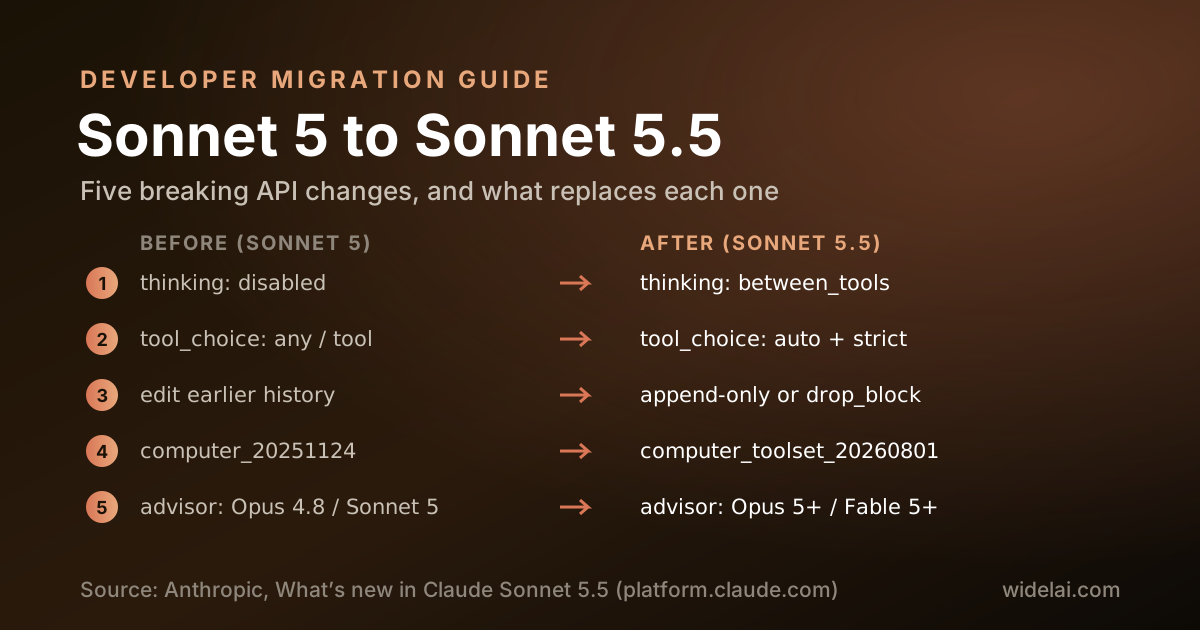
Claude Sonnet 5.5 is priced the same as Sonnet 5 and uses the same tokenizer, so it is tempting to treat the upgrade as a one-line model ID change. For many chat integrations it nearly is. For agents, tool pipelines and anything that manipulates conversation history, it is not. Anthropic lists five breaking changes for code already running on Sonnet 5, plus one change that alters the response shape without raising any error.
This guide walks through each change with before-and-after request examples, then gives you a checklist to run before you flip production traffic. It is written for developers calling the Anthropic API directly. If you use Sonnet 5.5 through WidelAI's chat or apps, we have already handled these changes for you, and the last section explains how.
Source: Anthropic's What's new in Claude Sonnet 5.5 and the Sonnet 5.5 prompting guide. Check them for the latest details before you ship.
What Stays the Same
Before the breaking changes, the reassuring part. These carry over unchanged from Sonnet 5:
- Price. $2 input and $10 output per million tokens, $0.20 per million for cache reads, and the same batch discounts.
- Tokenizer. The same text produces the same token count, so your cost estimates and context budgets still hold.
- Context and output. A 1M-token context window and 128K maximum output. On the Message Batches API, Sonnet 5.5 can write up to 300K output tokens with the
output-300k-2026-03-24beta header. - Sampling parameters are still rejected. Setting
temperature,top_portop_kto a non-default value returns a 400 error, as it did on Sonnet 5. - Availability. Claude API as
claude-sonnet-5-5, Amazon Bedrock asanthropic.claude-sonnet-5-5, and the same ID on Claude Platform on AWS, Google Cloud and Microsoft Foundry.
The first step is the obvious one:
{ "model": "claude-sonnet-5-5" }
Now the parts that need real work.
Breaking Change 1: between_tools Replaces disabled Thinking
On Sonnet 5 you could turn thinking off with thinking: {"type": "disabled"}. On Sonnet 5.5 that request returns a 400 invalid_request_error. The lowest thinking setting is now between_tools, which turns off up-front thinking.
// Before (Sonnet 5)
{ "thinking": { "type": "disabled" } }

// After (Sonnet 5.5)
{ "thinking": { "type": "between_tools" } }
The rules around it are strict:
- Effort must be low, medium or high. At xhigh or max, a request with
between_toolsreturns a 400. For those levels, use adaptive thinking by omitting the field or sending{"type": "adaptive"}. - Effort cannot change mid-conversation. With
between_tools, a per-message effort that differs from the level in effect returns a 400. If you need to vary effort per turn, use adaptive thinking. - No extra fields. Sending
display,budget_tokensorblock_bindingalongsidebetween_toolsreturns a 400. Manual budgets of the form{"type": "enabled", "budget_tokens": N}are also rejected. - Progress notes still arrive as thinking blocks. Between tool calls, the model's short progress updates come back as thinking blocks with summary text. Pass them back unchanged with the rest of the assistant turn.
Anthropic also advises removing any prompt instruction telling the model not to think when you use between_tools, because it makes internal tags more likely to leak into visible output. And for reasoning tasks without tools, prefer adaptive thinking: under between_tools with no tools, the model answers without thinking first.
Breaking Change 2: Forced Tool Use Returns an Error
Sonnet 5.5 does not support forcing a tool call. A tool_choice of {"type": "any"} or {"type": "tool", "name": "..."} returns a 400, including on the token counting endpoint. Only auto (the default) and none are accepted.
// Before (Sonnet 5)
{
  "tool_choice": { "type": "tool", "name": "record_invoice" },
  "tools": [{ "name": "record_invoice", "input_schema": { "...": "..." } }]
}

// After (Sonnet 5.5)
{
  "tool_choice": { "type": "auto" },
  "tools": [
    { "name": "record_invoice", "strict": true, "input_schema": { "...": "..." } }
  ]
}
Anthropic's recommended replacements depend on why you were forcing the tool:
- You needed schema-valid arguments. Keep
autoand setstrict: trueon the tool so its input is validated against the schema, or move the schema to structured outputs. - You needed the model to call the tool at all. Say in the prompt, or the system prompt, exactly when the tool applies. "Always record the invoice with record_invoice before replying" is usually enough.
This is the change most likely to break silently in a shared codebase, because the forcing often lives in a generic helper far from the Sonnet-specific code. Search for every place your code sets tool_choice.
Breaking Change 3: Thinking Blocks Are Tied to the Model and the Conversation
Every thinking block now records the model that produced it, and models only read some other models' blocks. Sonnet 5.5 reads thinking blocks from Sonnet 5, Opus 4.8, Haiku 4.5 and earlier models. It does not read blocks from Opus 5, Opus 5.5 or any Fable or Mythos model. No other model reads Sonnet 5.5's blocks.
What that means in practice:
- Moving from Sonnet 5 to Sonnet 5.5 keeps the reasoning. A conversation migrated mid-flight carries its thinking forward.
- Moving from Sonnet 5.5 to any other model drops it. The turns after the switch run without the earlier reasoning. The API silently drops blocks the target model cannot read; the request succeeds and dropped blocks are not billed.
- Editing history can now fail. The API checks whether anything before a Sonnet 5.5 thinking block has changed since it was produced: the system prompt, the tools, or an earlier message. For accounts created on or after August 31, 2026, that check is enforced by default, and replaying a block after such a change returns a 400.
The cleanest fix is to keep conversations append-only. Instead of editing the system prompt or the tool list, send a mid-conversation system message, which Sonnet 5.5 supports. If you must edit history, opt into dropping stale blocks instead of failing:
// Header: anthropic-beta: thinking-binding-controls-2026-08-01
{
  "thinking": {
    "type": "adaptive",
    "block_binding": { "prefix_mismatch_behavior": "drop_block" }
  }
}
block_binding works only with adaptive thinking. With between_tools, keep history append-only, or strip thinking blocks from the edited turn onward.
Sonnet 5.5 thinking blocks are also bound to the account that produced them. If you move conversations between Anthropic accounts, blocks from another account are dropped rather than replayed.
Breaking Change 4: Computer Use Needs the New Toolset
On the Claude API and Google Cloud, Sonnet 5.5 supports computer use only through computer_toolset_20260801. A request that declares the earlier computer_20251124 tool returns a 400 that names the rejected type. Amazon Bedrock still accepts the earlier tool.
// Before
{ "tools": [{ "type": "computer_20251124", "...": "..." }] }

// After (Claude API and Google Cloud)
{ "tools": [{ "type": "computer_toolset_20260801" }] }
The toolset is not just a rename. Your agent loop needs to handle member tool_use blocks, batch actions and toolset_name on results, and you can drop the old beta header. Integrations already on the toolset, and those using the browser use tool, need no change. Budget time to test this against real screens; the payoff is that Sonnet 5.5 scores 80.1% on Anthropic's OSWorld 2.1 computer-use benchmark.
Breaking Change 5: New Advisor Tool Pairings
If you use the advisor tool (beta) with Sonnet 5.5 as the executor, the advisor must be Claude Mythos 5.1, Fable 5.1, Mythos 5, Fable 5, Opus 5.5, Opus 5, or Sonnet 5.5 itself. Opus 4.8, Opus 4.7 and Sonnet 5 advisors worked with a Sonnet 5 executor but return a 400 with a Sonnet 5.5 executor.
Every advisor Sonnet 5.5 accepts returns its advice encrypted, as an advisor_redacted_result block. If your application displayed advisor text to users or logged it for review, that path stops working.
The Silent Change: Text Between Tool Calls
This one does not raise an error, which makes it the easiest to miss. Between tool calls, Sonnet 5.5 writes user-facing notes about what it found and what it is doing next. Notes longer than a sentence or two now come back as progress-update thinking blocks instead of text. Under the default display: "omitted", their text is empty.
The result: a chat or agent interface that renders only text blocks goes quiet during long tool-using turns. Nothing fails; the user just stops seeing progress.
Two fixes:
// Option A: adaptive thinking with visible updates
// Header: anthropic-beta: thinking-display-updates-2026-08-18
{ "thinking": { "type": "adaptive", "display": "updates" } }

// Option B: no up-front thinking; progress notes return with summary text
{ "thinking": { "type": "between_tools" } }
Also remove old instructions such as "hold all findings for the final response", and do not assume the first content block in a response is text. With adaptive thinking it can be a thinking block; with between_tools it can be a progress update.
Behavior Changes to Re-Test
Beyond the API changes, Anthropic calls out behaviors that shift without any code change:
- Effort is recalibrated. A level does not produce the same thinking as on Sonnet 5. Re-run your effort sweep. Anthropic suggests starting at high, or at medium for well-specified agentic coding and latency-sensitive chat.
- Thinking counts toward
max_tokens. Size it for thinking plus the reply. For agentic coding, Anthropic recommends 128,000 with streaming. - Minimum cacheable prompt is 512 tokens, down from 1,024 on Sonnet 5. Short system prompts that never cached before may now cache.
- Refusals are categorized. A decline returns HTTP 200 with
stop_reason: "refusal"and astop_detailscategory:cyber,bio,frontier_llm,reasoning_extractionorgeneral_harms. Handle it explicitly rather than treating it as an empty reply. - Server-side fallback is available. With
fallbacks: "default"(beta),cyberandfrontier_llmdeclines are retried on Sonnet 5. The other categories are not. - Mid-turn user input needs the right placement. Sonnet 5.5 resists prompt injection and may treat user text inside a
tool_resultblock as suspicious. Put user input in a text block after the lasttool_resultin the user turn. - Tool names may vary in letter case. Occasionally it calls
bashforBash. Accept unambiguous matches, or returnis_error: truewith the exact name so it corrects itself.
New Features Worth Adopting
Sonnet 5.5 also adds capabilities Sonnet 5 did not have, several of which make the breaking changes easier to live with:
- Per-message effort (beta). Change effort for a single turn without invalidating the prompt cache. Requires adaptive thinking.
- Mid-conversation system messages. Change instructions without editing the system prompt, which keeps history append-only.
- Mid-conversation tool changes (beta) and inline tool definitions (
inline-tools-2026-09-15). Add or change tools mid-conversation without editingtoolsor losing the cache. - Compact on demand (beta). With
compact-2026-09-04, request a signed compaction block that summarizes the conversation while keeping thinking blocks in retained turns valid.
Migration Checklist
Run through this before moving production traffic:
- Model ID updated to
claude-sonnet-5-5(oranthropic.claude-sonnet-5-5on Bedrock) - Every
thinking: {"type": "disabled"}replaced withbetween_tools, at high effort or below - No
between_toolsrequest uses xhigh or max, or varies effort per message - Every
tool_choiceofanyortoolreplaced withautoplusstricttools or a prompt instruction - Conversation history is append-only, or
block_bindingis configured - Computer use moved to
computer_toolset_20260801on the Claude API and Google Cloud - Advisor tool uses a supported advisor model
- UI renders progress-update thinking blocks, or uses
display: "updates" -
max_tokenssized for thinking plus reply - Refusal handling reads
stop_details.category - Effort sweep re-run against your own evaluations
How WidelAI Handles It
If you use Sonnet 5.5 through WidelAI, most of this is already done. When we added the model, we checked our Anthropic integration against each change:
- Forced tool use. WidelAI's agent API accepts a
requiredor named tool choice for any model. For Sonnet 5.5 we now sendautoinstead, following Anthropic's guidance, so a request that would have failed with a 400 completes normally. Other Claude models keep the forced behavior. - Thinking and sampling. We never send
disabledthinking, and we omit sampling parameters whenever a reasoning effort is set. - History edits. WidelAI replays the visible conversation, not provider thinking blocks, so switching between Sonnet 5.5 and other models mid-thread works without binding errors.
- Effort. The Reasoning effort picker maps Low, Medium, High, Extra and Max to Anthropic's levels, defaulting to Medium.
Sonnet 5.5 costs 0.40 input and 2.00 output credits per 1K tokens on WidelAI's Pro plan. You can compare it with every other model on the models page and the pricing transparency page.
Related Reading

Do your best AI work in one place
Bring your next question, draft, file, or idea to WidelAI. Choose the model that fits the moment, keep your work together, and stay in control of privacy and usage.
Leading models, one workspace
Use powerful AI models without juggling separate tabs, accounts, or workflows.
Switch without starting over
Change models as your work evolves while keeping the conversation and context together.
The right model for every task
Choose speed for everyday work or deeper reasoning for complex questions and decisions.
Clear credits and model rates
See your balance, understand each model’s rate, and track usage from one place.
Bring your files and images
Work with documents and images alongside your prompts in the same focused experience.
Your work stays yours
Your data is encrypted in transit and at rest, and your content is never used to train AI models.