How to Use GPT-6 Astra on WidelAI: A Practical Guide
Learn how to use GPT-6 Astra on WidelAI: write stronger prompts, select reasoning effort, control long-context costs, design tool workflows, and migrate safely from GPT-5.6 Sol.
WidelAI Engineering
Building practical, verifiable AI workflows
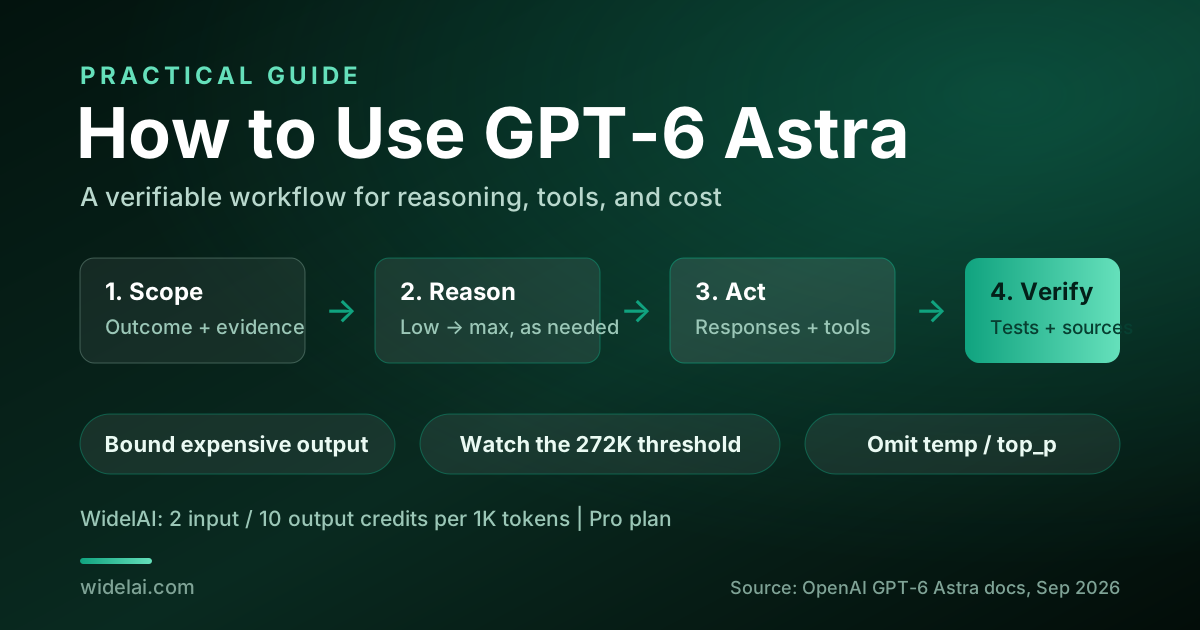
How to use GPT-6 Astra on WidelAI is less about finding a magic phrase and more about matching the model's controls to the job. GPT-6 Astra can accept text and images across a 1,050,000-token context window, produce up to 128,000 output tokens, call modern tools, and reason at five supported effort levels. Those capabilities make it unusually flexible, but they also create more ways to overspend or carry an outdated integration forward.
This practical guide shows you how to select GPT-6 Astra on WidelAI, structure a strong prompt, choose reasoning effort, control token cost, design tool-using workflows, and migrate from GPT-5.6 Sol. It separates what you can do in the WidelAI workspace from lower-level OpenAI API controls, so you can use the right instructions in the right place.
GPT-6 Astra was released by OpenAI on September 3, 2026. The canonical model ID is gpt-6-astra, and WidelAI now makes it available on the Pro plan. For the release overview, read GPT-6 Astra Is Now Available on WidelAI. For a direct selection framework, see GPT-6 Astra vs GPT-5.6 Sol.
1. Start With the Right Surface
On WidelAI, sign in, open the chat workspace, and choose GPT-6 Astra from the model selector. If you are new, create an account and choose the Pro plan. WidelAI uses one credit balance across supported models, so you can begin a draft on a lower-cost model and switch the same conversation to Astra when the work becomes genuinely demanding.
If you are building directly against OpenAI, use the model ID gpt-6-astra. Astra supports both the Responses API and Chat Completions, but OpenAI recommends the Responses API for tool calling. That distinction matters. Chat Completions remains useful for compatible text conversations, while Responses is the natural home for stateful, multi-step work involving tools, asynchronous operations, mid-turn steering, and configuration changes.
Do not assume every API control appears as a WidelAI chat setting. In the WidelAI workspace, focus on the prompt, attachments, model switching, and visible usage. In a direct integration, configure the supported request fields and tool lifecycle in code.
2. Build a Prompt Around Outcome, Evidence, and Boundaries
Astra is designed for substantial work, but a large model cannot infer your acceptance criteria. A reliable prompt contains five parts:
- Outcome: State the decision, artifact, or change you need.
- Context: Include the documents, images, code, history, or constraints that affect the answer.
- Evidence standard: Say which sources are authoritative and where uncertainty must be called out.
- Boundaries: Name files, systems, dates, budgets, safety limits, or behaviors that must not change.
- Output contract: Define the format, depth, and validation expected.
For example, a weak request says, “Review this migration.” A stronger request says:
Review the attached API migration plan from GPT-5.6 Sol to GPT-6 Astra. Identify unsupported assumptions, separate required changes from optional optimizations, and produce a numbered cutover checklist. Use only the attached implementation and OpenAI's current Astra documentation as evidence. Do not propose database or authentication changes. End with rollback criteria and unresolved questions.
This shape gives Astra room to reason while making completion measurable. It also limits expensive output drift: a checklist plus unresolved questions is more useful than an open-ended essay.
Put stable context before changing instructions
When a workflow repeatedly uses the same policy, repository map, product brief, or data dictionary, place that stable material first and the changing task near the end. This creates a clear hierarchy for the model and makes repeated work easier to inspect. In direct API workloads, a stable prefix can also improve the opportunity for cached-input pricing, although cache behavior depends on the actual request path and provider implementation.
Ask for assumptions explicitly
Astra's April 30, 2026 knowledge cutoff means later events need supplied context or retrieval. Even before that date, a model can be wrong. Add a simple rule: “List any fact that depends on information not present in the supplied material.” For research, require links and distinguish source statements from conclusions. For code, require tests or a reproducible verification step.
Use images as evidence, not decoration
GPT-6 Astra accepts text and image input and returns text. When attaching a chart, screenshot, diagram, or UI state, tell the model what role the image plays. Ask it to transcribe visible labels before drawing conclusions, identify uncertainty caused by resolution, and avoid treating a visual estimate as an exact measurement. This sequence helps prevent confident analysis of a misread screenshot.
3. Choose Reasoning Effort Deliberately
GPT-6 Astra supports low, medium, high, xhigh, and max reasoning effort. It does not support a “none” setting. Higher effort is not a universal quality switch; it gives the model more room for difficult reasoning and can increase latency and token use. Start at the lowest level that reliably clears your quality bar.
| Effort | Good starting point for | Escalate when |
|---|---|---|
| Low | Classification, extraction, rewriting, straightforward summaries | The task requires several dependent inferences |
| Medium | Everyday coding, document analysis, planning, structured recommendations | Important constraints are being missed |
| High | Complex debugging, architecture trade-offs, long research synthesis | Competing hypotheses remain unresolved |
| Xhigh | Hard multi-system analysis, difficult scientific or professional work | High effort is still shallow or unstable |
| Max | The rarest, highest-consequence problems with strong verification | Use only when the value justifies maximum latency and spend |
A sound escalation loop has three steps. First, run a representative prompt at low or medium effort. Second, evaluate it against an explicit rubric: correctness, constraint coverage, evidence, and format. Third, increase effort only if the failure is genuinely reasoning-related. If the prompt omitted a key log or policy, increasing effort will not supply the missing evidence.
Avoid changing model, prompt, tools, and effort simultaneously during migration. You will not know which change caused an improvement or regression. Build a small evaluation set and vary one dimension at a time.
4. Control Cost Before You Send
WidelAI charges GPT-6 Astra at 2 credits per 1,000 input tokens and 10 credits per 1,000 output tokens. Those rates make the cost relationship easy to remember: output is five times the standard input rate. A 20,000-token prompt with a 2,000-token answer uses about 40 input credits plus 20 output credits, or 60 credits before any provider-specific long-context behavior outside the standard WidelAI chat rate.
For direct OpenAI API usage, the published standard prices are:
| Token category | Price per million tokens |
|---|---|
| Input | $10.00 |
| Cached input | $1.00 |
| Cache writes | $12.50 |
| Output | $50.00 |
Requests whose prompts exceed 272,000 tokens enter long-context pricing: input, cached input, and cache writes are billed at 2x, while output is billed at 1.5x. That makes the corresponding rates $20 per million input tokens, $2 per million cached-input tokens, $25 per million cache-write tokens, and $75 per million output tokens. The threshold applies to the prompt, not to the advertised 1,050,000-token capacity as a whole.
Two optional API modes change price again. Eligible Batch and Flex work is priced at 50% of standard rates, while fast mode is 2x. Treat these as execution choices, not model-quality labels. Batch or Flex can make sense for non-interactive evaluation, enrichment, and back-office processing. Fast mode can be worthwhile when response time has direct business value. Verify mode eligibility and current terms in the official model documentation before budgeting.
Practical cost controls
- Set an output contract. Ask for a diff, table, decision memo, or bounded list rather than “everything you know.”
- Retrieve before stuffing. A million-token window permits huge prompts, but relevance still matters. Select the documents needed for the task.
- Summarize completed phases. Preserve decisions and evidence, then remove verbose intermediate discussion when it no longer helps.
- Keep reusable context stable. This supports clarity and may improve cache reuse in direct API workloads.
- Measure input and output separately. A workflow with cheap-looking prompts can still be expensive if it generates long reports.
- Route routine steps down. Use a lower-cost model for extraction or formatting, then send the condensed evidence to Astra for the hard decision.
The pricing transparency page lists WidelAI credit rates so you can compare models before starting a large run.
5. Design Tool Workflows for the Responses API
Astra supports streaming, function calling, structured outputs, and modern tools. It also adds workflow behavior that deserves explicit design: asynchronous tools, mid-turn steering, and configuration_update.
Define narrow functions
A useful function has a precise purpose, a strict input schema, predictable errors, and authorization enforced outside the model. Prefer “get_invoice_status(invoice_id)” over a broad “run_billing_action” tool. Return only the fields needed for the next reasoning step. Structured outputs help constrain what the model emits, but your application must still validate values and permissions.
Separate reads from writes
Give read-only tools a different contract from state-changing tools. For any write, require confirmation when the action is consequential, use idempotency keys where appropriate, and log the exact arguments. The model can recommend an action; your application remains responsible for deciding whether that action is authorized.
Use asynchronous tools for slow operations
Asynchronous tool support is useful when a search, build, analysis job, or external workflow cannot finish inside one synchronous turn. Design a job lifecycle with a stable ID, explicit pending/succeeded/failed states, retry rules, and a final result schema. Do not make the model infer whether a timeout means “still running” or “failed.”
Steer without discarding the run
Mid-turn steering lets an application provide updated direction while a longer task is in progress. Use it to clarify priorities, add newly available evidence, or stop a path that has become irrelevant. A steering message should be concise and non-contradictory: state what changed, what remains valid, and the new completion target.
Treat configuration updates as auditable state
The configuration_update capability can adjust supported configuration during a workflow. Keep configuration changes explicit, scoped, and logged. If a run changes tool availability or another important setting, your audit trail should show the before state, update, reason, and resulting behavior. Never let an untrusted document silently redefine permissions.
OpenAI's latest-model guide is the authoritative place to confirm request structure and supported tools.
6. Migrate From GPT-5.6 Sol Without Carrying Old Assumptions
Astra supports Responses and Chat Completions, so migration can look deceptively simple. The model ID changes, but a safe migration also revisits parameters, evaluations, cost limits, and tool behavior.
Migration checklist
- Create a representative evaluation set. Include routine prompts, hard prompts, image inputs, tool calls, refusals, long-context cases, and malformed inputs.
- Change the model ID to gpt-6-astra in a controlled environment. Do not combine the model switch with unrelated prompt rewrites.
- Remove unsupported sampling controls. Omit temperature, top_p, and top_logprobs for Astra rather than passing inherited values.
- Choose a supported reasoning effort. Map old behavior to low, medium, high, xhigh, or max; do not send none.
- Prefer Responses for tool use. Re-test function schemas, parallel or asynchronous lifecycle behavior, streaming events, and error handling.
- Recalculate limits. Account for $10/$50 standard token pricing, cache prices, the 272K long-context threshold, and any execution-mode multiplier.
- Compare outcomes, not verbosity. OpenAI says Astra can use fewer output tokens than GPT-5.6 Sol while improving several work categories. A shorter answer is not a regression if it satisfies the rubric.
- Canary the rollout. Route a limited share of traffic, monitor quality and cost, then expand with a rollback path.
Do not copy a Sol-era system prompt unchanged merely because it still runs. Remove instructions that force excessive chain-of-thought-like exposition, duplicate tool descriptions, or overlong restatement. Ask for concise rationale, evidence, and verification instead.
7. Apply Astra to the Work That Benefits
Software engineering
Provide the repository constraints, failing behavior, relevant code, and test command. Ask Astra to explain the root cause before writing a minimal patch, then require targeted tests. Use high effort for cross-module failures; medium is often enough for bounded code changes.
Browsing and professional research
Define a source hierarchy, date boundary, and citation requirement. Ask the model to separate facts, source claims, and its synthesis. For a market or policy memo, require a table of unresolved conflicts instead of smoothing them over.
Computer-use workflows
Treat every interface action as potentially fallible. Require a plan, checkpoints before destructive actions, and confirmation of the observed post-action state. Do not rely on a click alone as proof that a transaction succeeded.
Science and large-document analysis
Use the long context for relevant primary material, not indiscriminate archives. Ask Astra to map claims to sections, identify missing controls or contradictory evidence, and mark where conclusions exceed the supplied data. The April 30, 2026 cutoff makes current source retrieval especially important for later research.
Defensive security
OpenAI identifies Astra as its first model reaching a Critical cyber-capability classification. Use it only on systems and data you own or are explicitly authorized to assess. Keep work defensive: code review, secure configuration, vulnerability triage, detection engineering, incident analysis, and remediation. Enforce scopes and approvals in the surrounding application. Read OpenAI's GPT-6 Astra safety overview and Path to Astra for the official framing.
8. Avoid the Common Failure Modes
- Defaulting every task to max effort. This adds cost and latency without fixing missing context or vague criteria.
- Filling the context window because it exists. Capacity is not relevance, and prompts over 272K have higher direct API rates.
- Leaving output unbounded. Astra may be efficient, but output still has the highest per-token price.
- Using Chat Completions for a new tool-heavy design by habit. Use Responses where OpenAI recommends it.
- Passing temperature, top_p, or top_logprobs. Omit them for Astra.
- Assuming tool output is trusted. Validate schemas, sanitize untrusted content, and enforce permissions in code.
- Treating a model claim as verification. Run tests, inspect citations, and confirm external side effects.
- Using advanced cyber capability outside authorization. Keep security work defensive, scoped, and approved.
A Repeatable Astra Workflow
A practical default looks like this:
- Draft the task on a lower-cost model if it is routine.
- Gather only the evidence Astra needs.
- State outcome, constraints, evidence standard, and output format.
- Start at medium reasoning effort for substantial work.
- Escalate effort only after diagnosing a reasoning failure.
- Use Responses and narrow tools for agentic workflows.
- Bound output and watch the 272K prompt threshold.
- Verify the result with tests, citations, or observed state.
- Record cost and quality so the next routing decision is evidence-based.
Start Using GPT-6 Astra
GPT-6 Astra is available on WidelAI's Pro plan. Open the chat workspace, select GPT-6 Astra, and start with a difficult task whose success criteria you can verify. If you are still choosing between tiers, use the Astra vs GPT-5.6 Sol comparison; for release details and official source links, read the Astra launch announcement.

Do your best AI work in one place
Bring your next question, draft, file, or idea to WidelAI. Choose the model that fits the moment, keep your work together, and stay in control of privacy and usage.
Leading models, one workspace
Use powerful AI models without juggling separate tabs, accounts, or workflows.
Switch without starting over
Change models as your work evolves while keeping the conversation and context together.
The right model for every task
Choose speed for everyday work or deeper reasoning for complex questions and decisions.
Clear credits and model rates
See your balance, understand each model’s rate, and track usage from one place.
Bring your files and images
Work with documents and images alongside your prompts in the same focused experience.
Your work stays yours
Your data is encrypted in transit and at rest, and your content is never used to train AI models.